3 Actions with Model Context Protocol for AI agents
This chapter introduces the Model Context Protocol (MCP) as the “USB‑C” for AI agents and LLMs—a unified, JSON‑RPC 2.0–based standard that normalizes how models discover and invoke external capabilities. It explains the problems MCP solves—fragmented tool interfaces, inconsistent data access, brittle multi‑agent orchestration, and uneven security—and presents its core architecture of clients, servers, and backing services. Servers expose three discoverable component types—tools, resources, and prompts—with tools as the primary execution surface. The chapter also outlines deployment patterns and transports: local STDIO for low‑latency, one‑to‑one integrations; HTTP/SSE for scalable, multi‑client, networked access; and hybrids that mix both. MCP is positioned not just as a tool bridge but as a connective layer across all agent functions—from actions and planning to memory and evaluation.
Readers learn how to get started by connecting MCP servers to LLM applications (e.g., configuring a desktop client to register and use server tools) and by exploring servers with the MCP Inspector to enumerate capabilities and run tools interactively. The text contrasts assistant-style usage, which requires human approval for tool execution, with autonomous agents that programmatically discover and call MCP tools without supervision—highlighting the need for careful permissions and guardrails. It further shows how MCP augments every agent layer: domain tools for action execution, reasoning and planning helpers, knowledge/memory connectors to files and databases, and feedback/evaluation utilities—all accessed through consistent discovery endpoints.
On the agent side, the chapter demonstrates actioning MCP servers locally (via STDIO) or remotely (via SSE) with modern agent SDKs, and shows how to consume community servers (filesystem, web search, calendars, docs, code hosts, and more) to extend capabilities rapidly. It then walks through building MCP servers with minimal code, converting existing in‑agent tools into reusable, isolated services that enable clean separation of concerns, reuse across workflows, and easier scaling. A running example migrates journaling tools into a standalone server and consumes them from agents over either transport, while emphasizing safety practices: validate server behavior, limit scope (especially for file operations), and bake in evaluation/feedback to prevent unintended actions. The result is a practical blueprint for interoperable, secure, and maintainable agent systems powered by MCP.
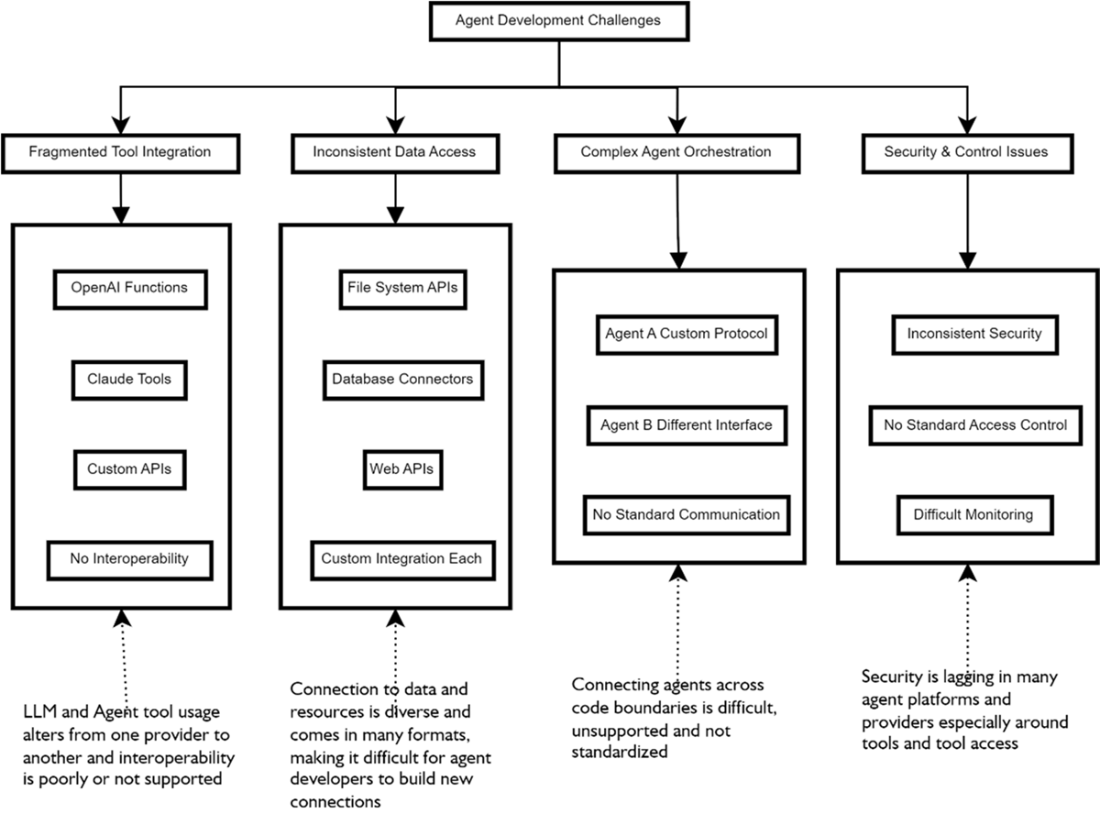
The leading challenges AI Agent developers face when building agents include fragmented tool integration, inconsistant data access, complicated multiple-agent orchestration, and security and control.
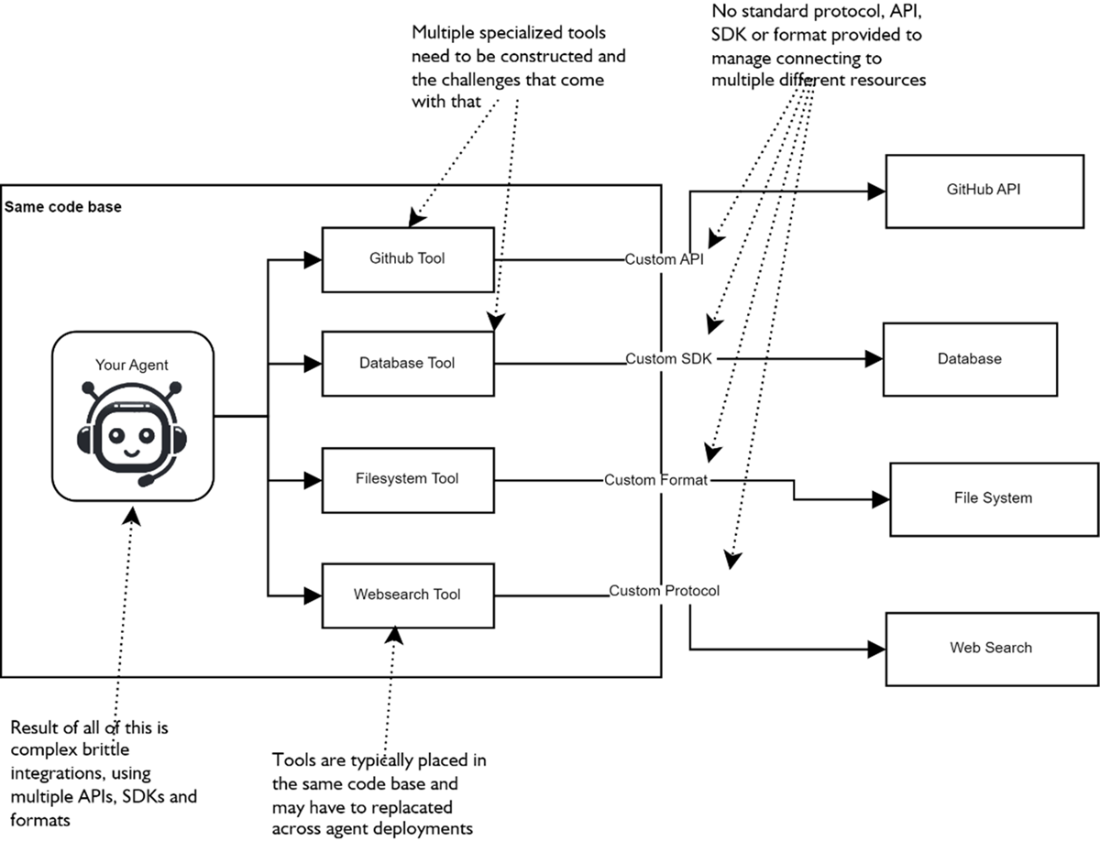
A typical problem agent/LLM developers face when connecting to multiple services and resources is the lack of standardized connections and the need to support multiple different connectors to whatever services they need access to.
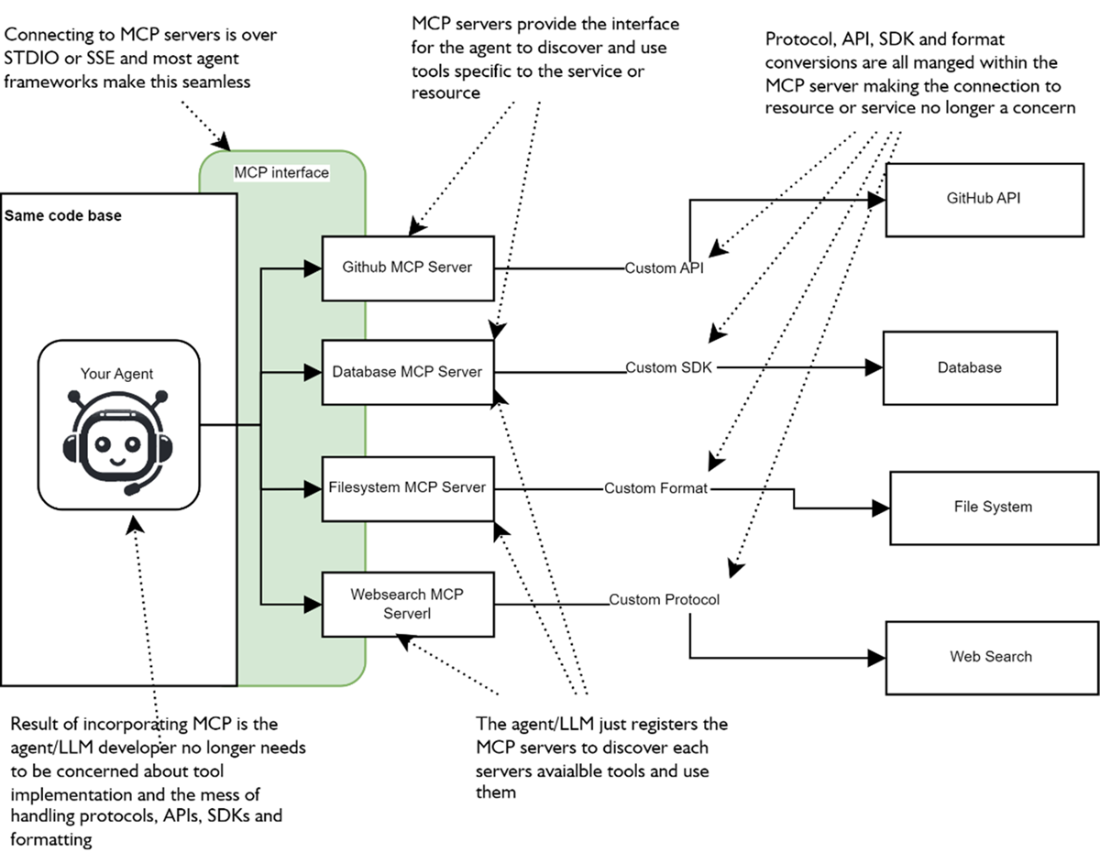
Implementing MCP as a service layer abstracts access to the various services that agent may want to connect to and use.
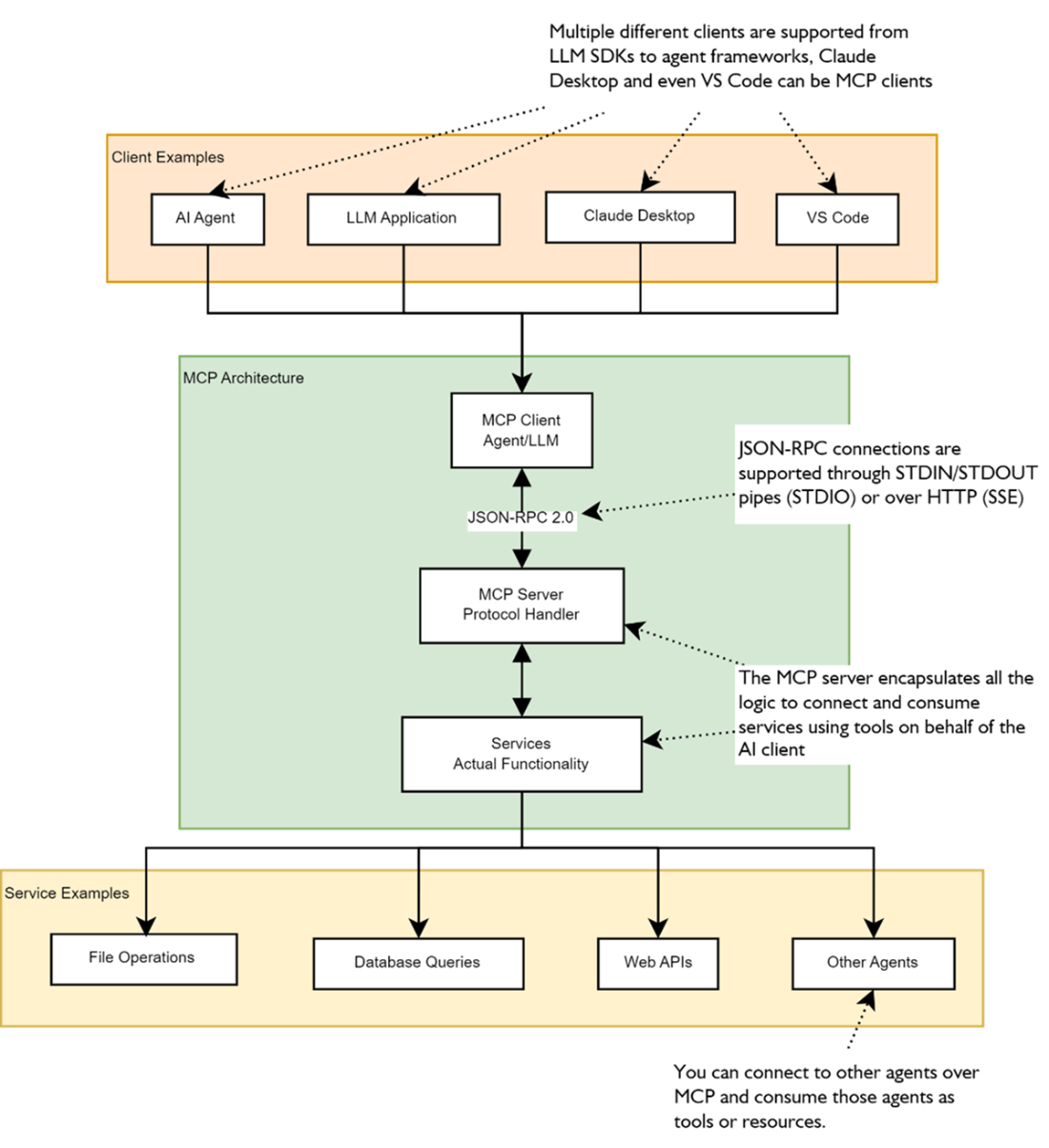
The basic components of MCP architecture are the client, server, and services. Here you can see some common clients (agents, LLM applications, Claude desktop, and VS code) and potential services (file operations, database queries, web APIs, and other agents) that the clients might connect to.
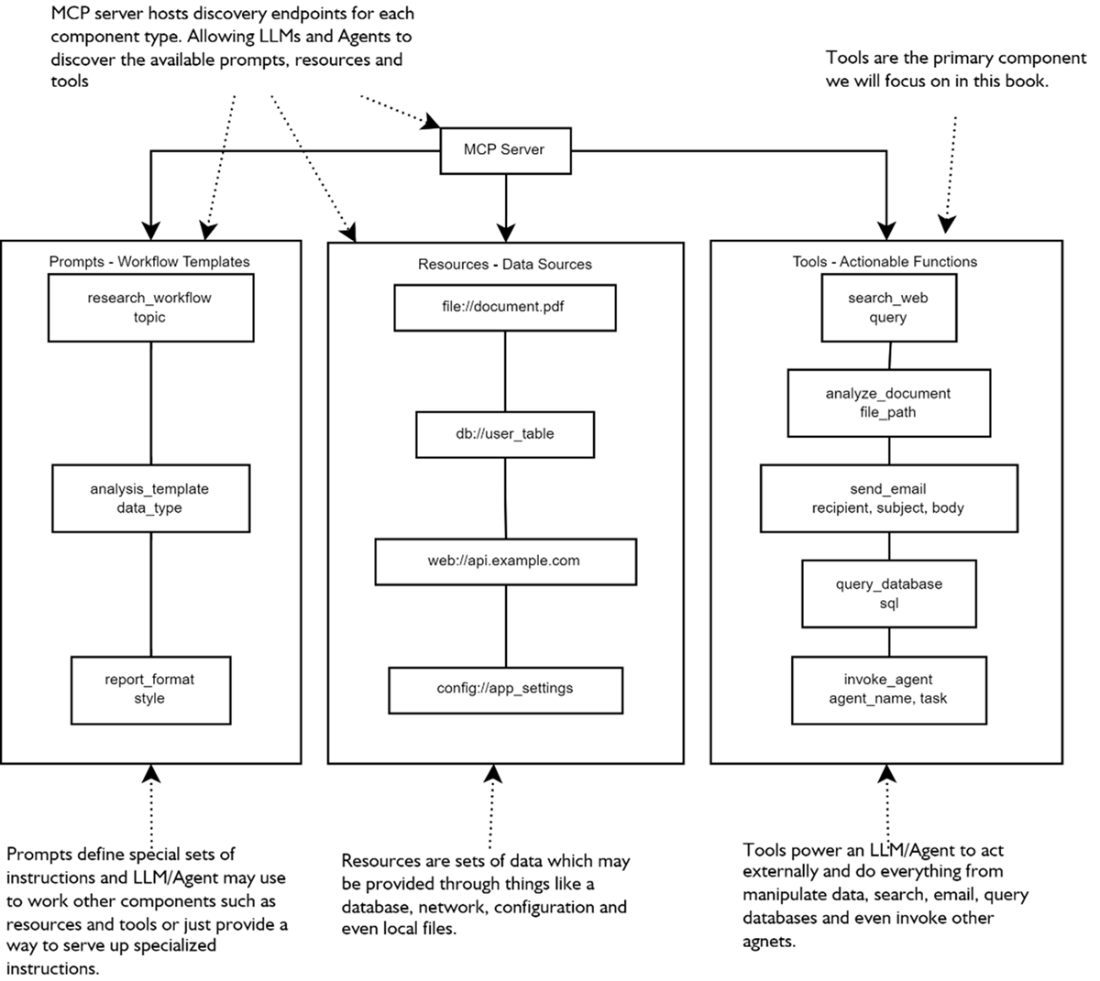
The main components of an MCP server include prompts, specialized system instructions; resources (used for access to files), configuration, and databases; and Tools, which are extensions of an internals agent’s ability to consume and use tools
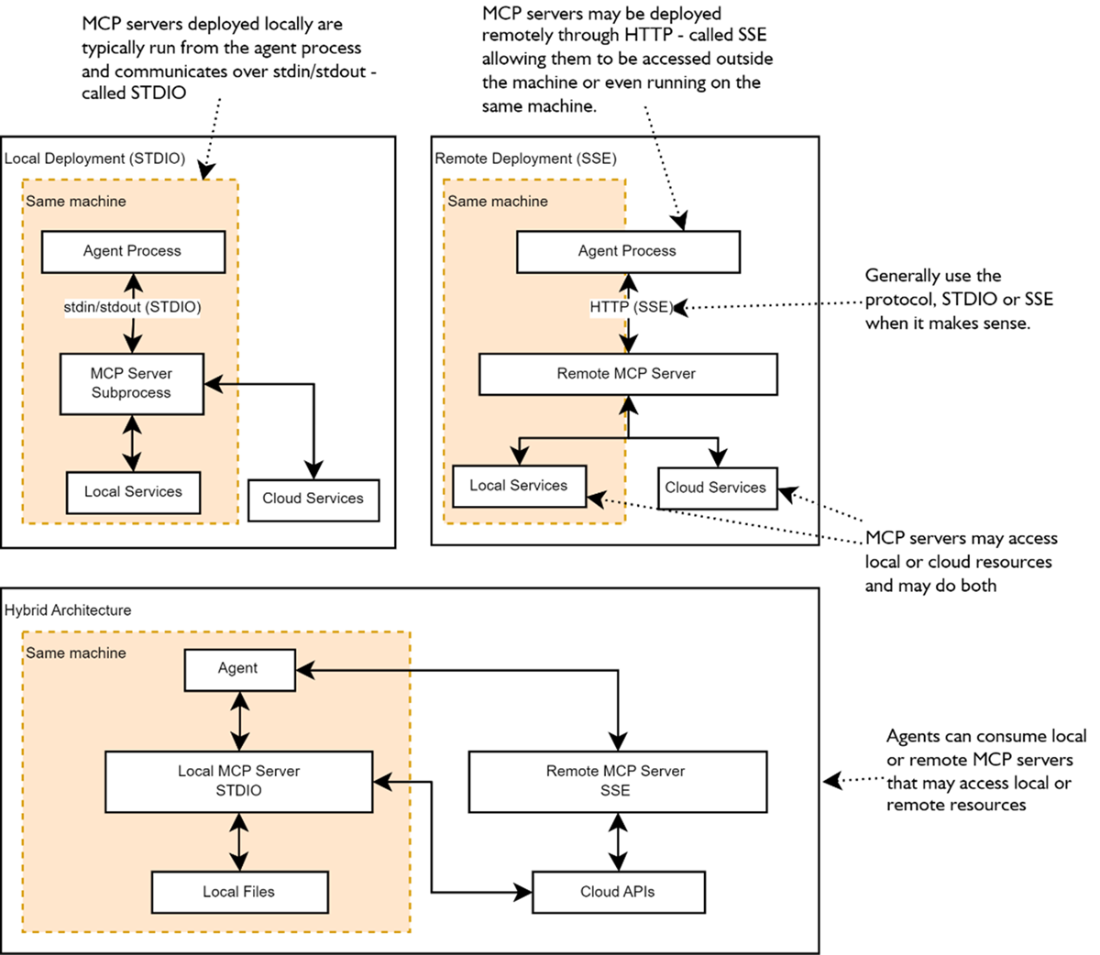
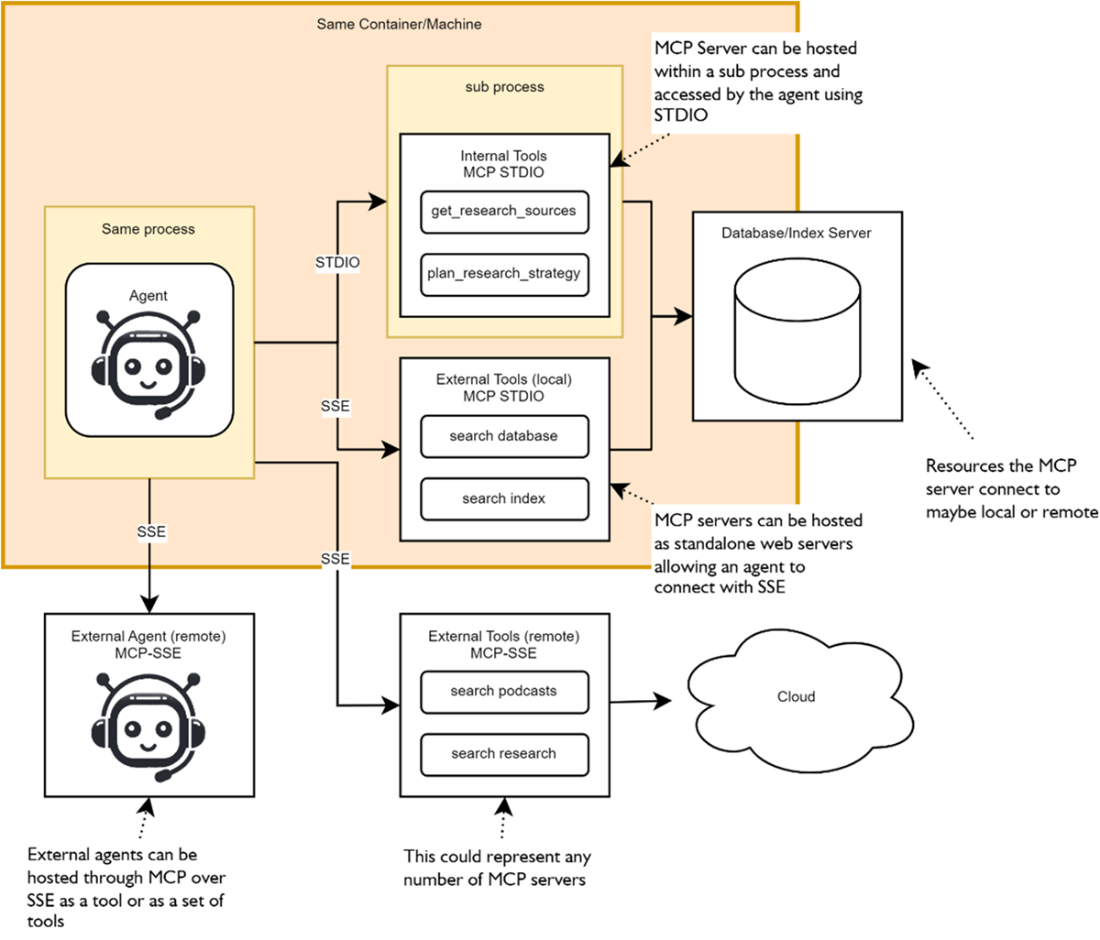
The various deployment patterns that may be used to connect MCP servers to agents. From running locally and within a child process on the same machine, running remotely and accessible over HTTP to include hybrid architectures that blend local and remote MCP servers to single agent.
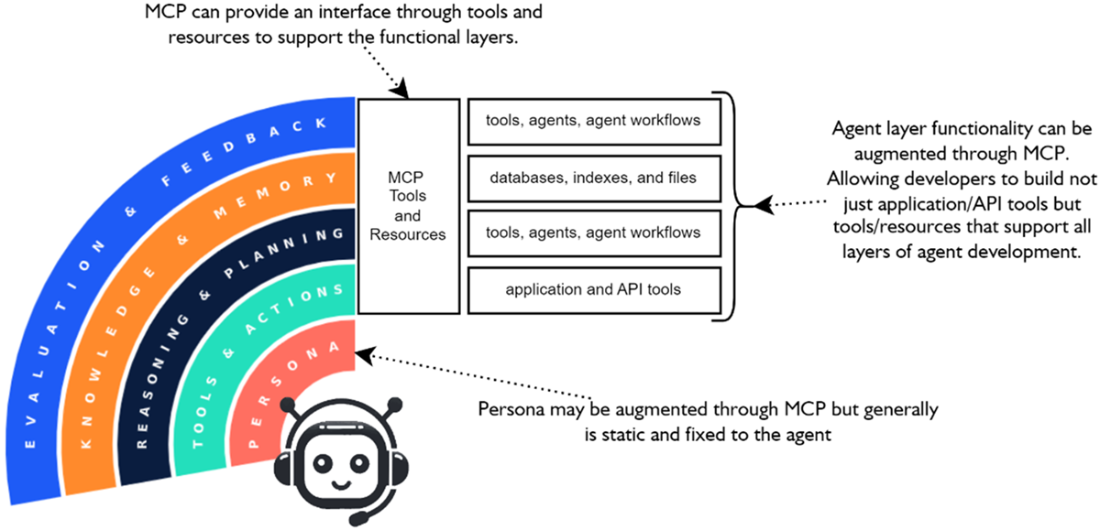
MCP can be used to add functionality in the form of tools to all the functional agent layers.
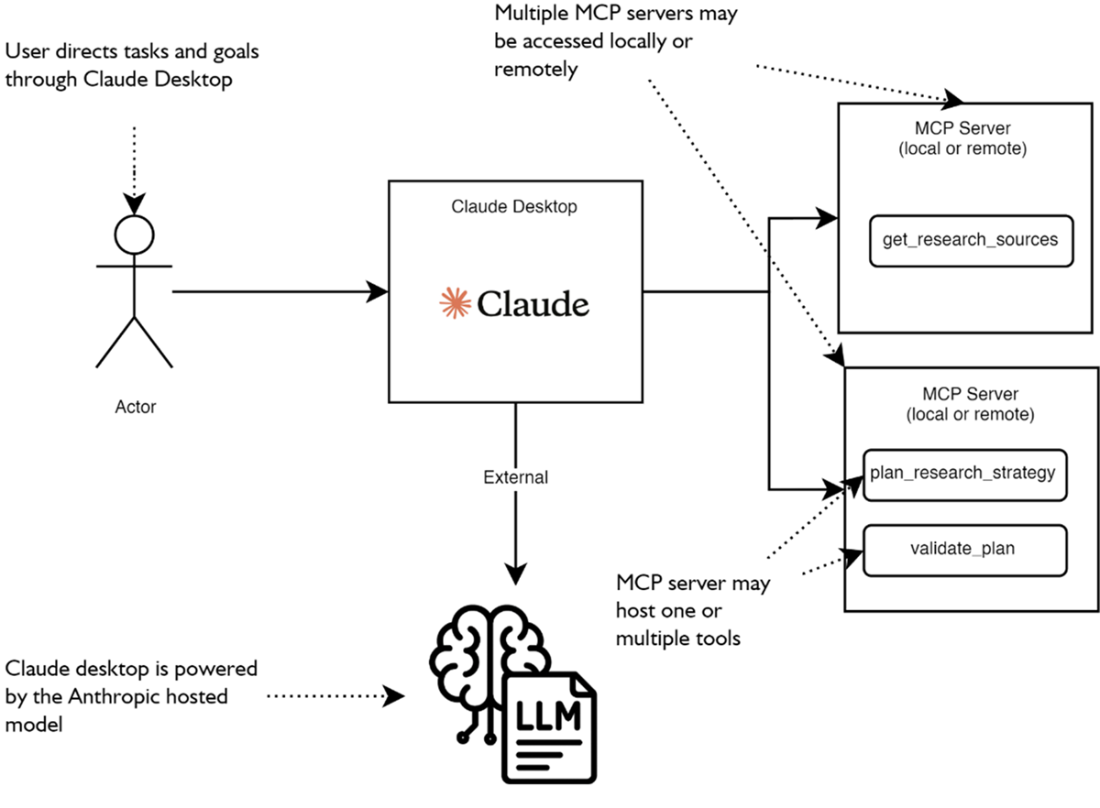
Claude desktop may consume multiple MCP servers deployed locally or remotely. The LLM that powers Claude then uses the MCP components (generally tools) to enhance its capabilities.
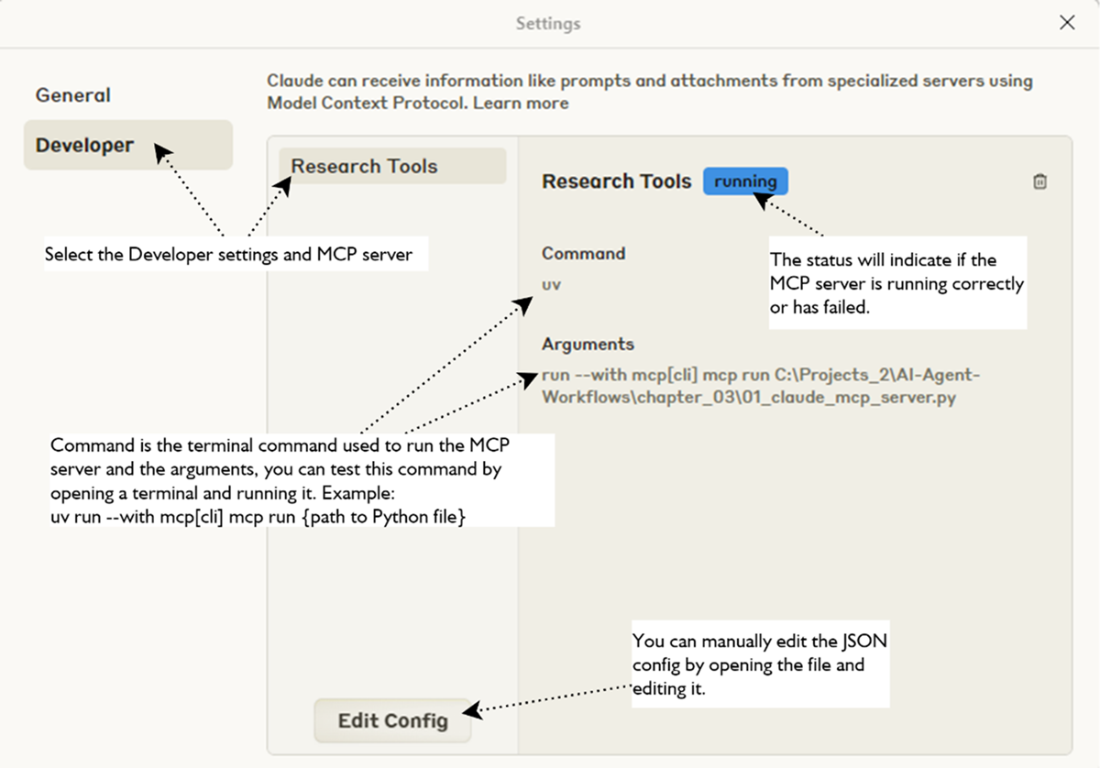
Shows the MCP server settings for Python file
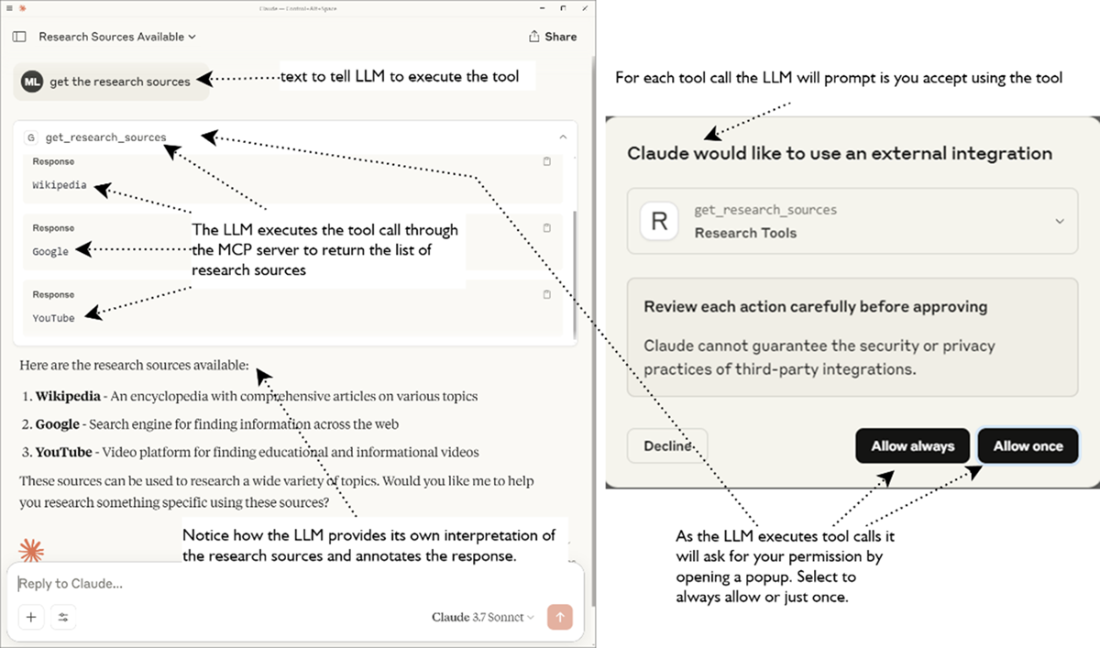
Shows the MCP hosted tool being executed within Claude desktop
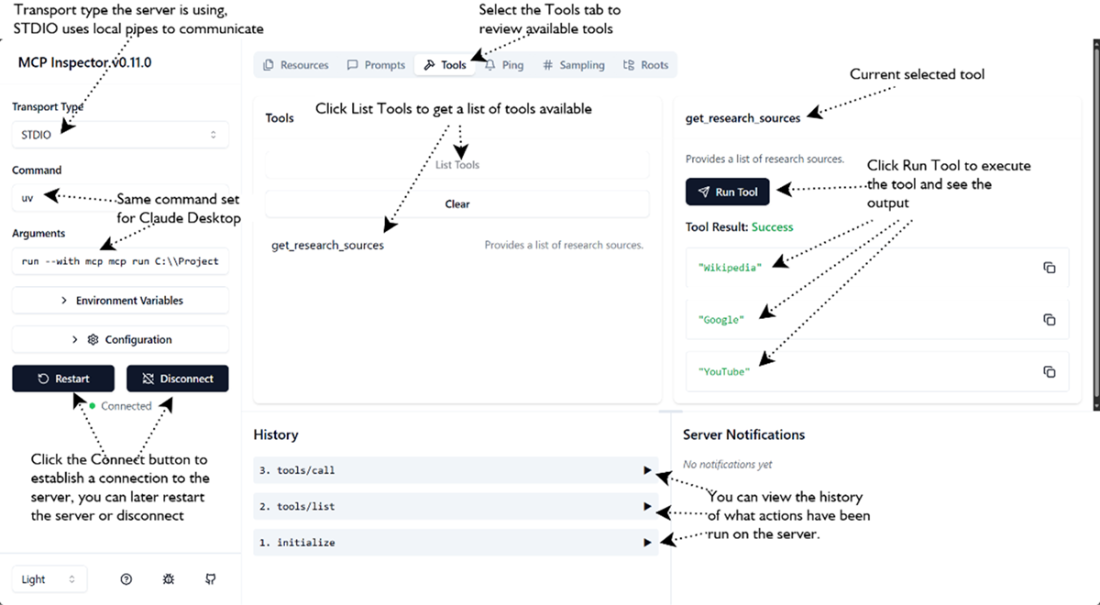
Shows the MCP Inspector interface examing available tools and executing them
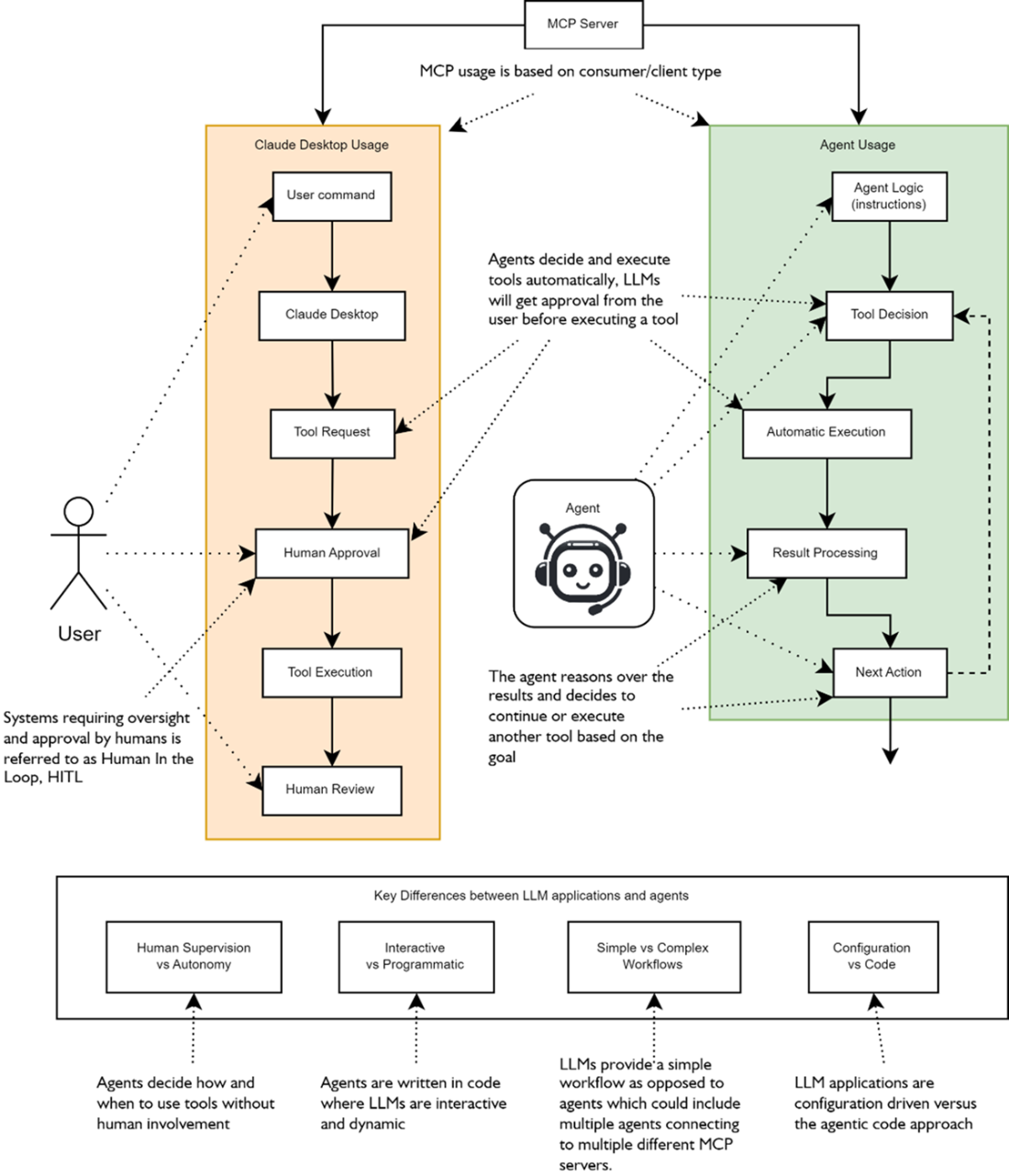
The key differences between MCP tool execution from an LLM application (Claude Desktop) or through using an agent include; assistants require human supervision while agents are autonomous, assistants are interactive to agents programmatic, agents perform more complex multi-step workflows and assistants typically are limited to performing simple plans.
Shows the various ways an agent may interact with and consume MCP servers
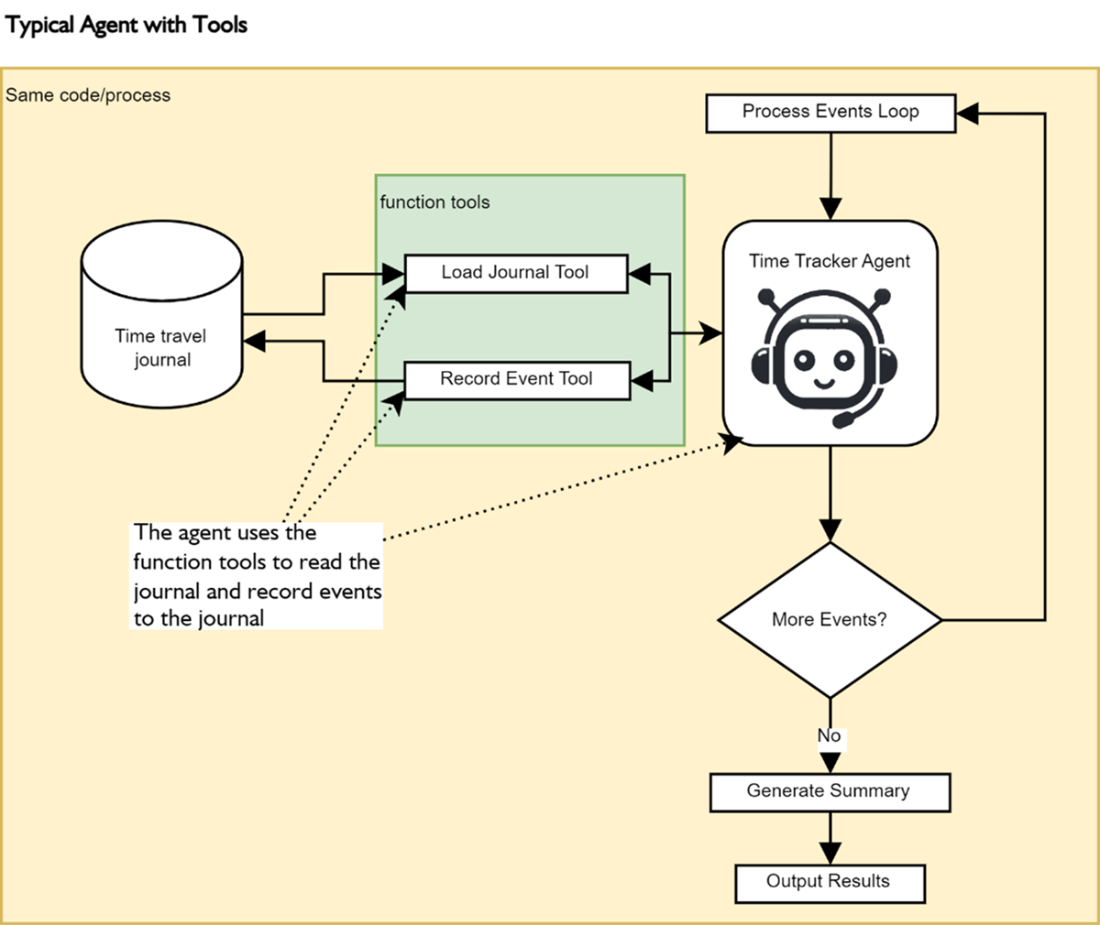
The time tracker agent will record time events using internal function tools as it processes the events in a loop. After the loop finishes the agent is asked to summarize the events and it will use the Load Journal Evants tool to load the journal of events and summarize
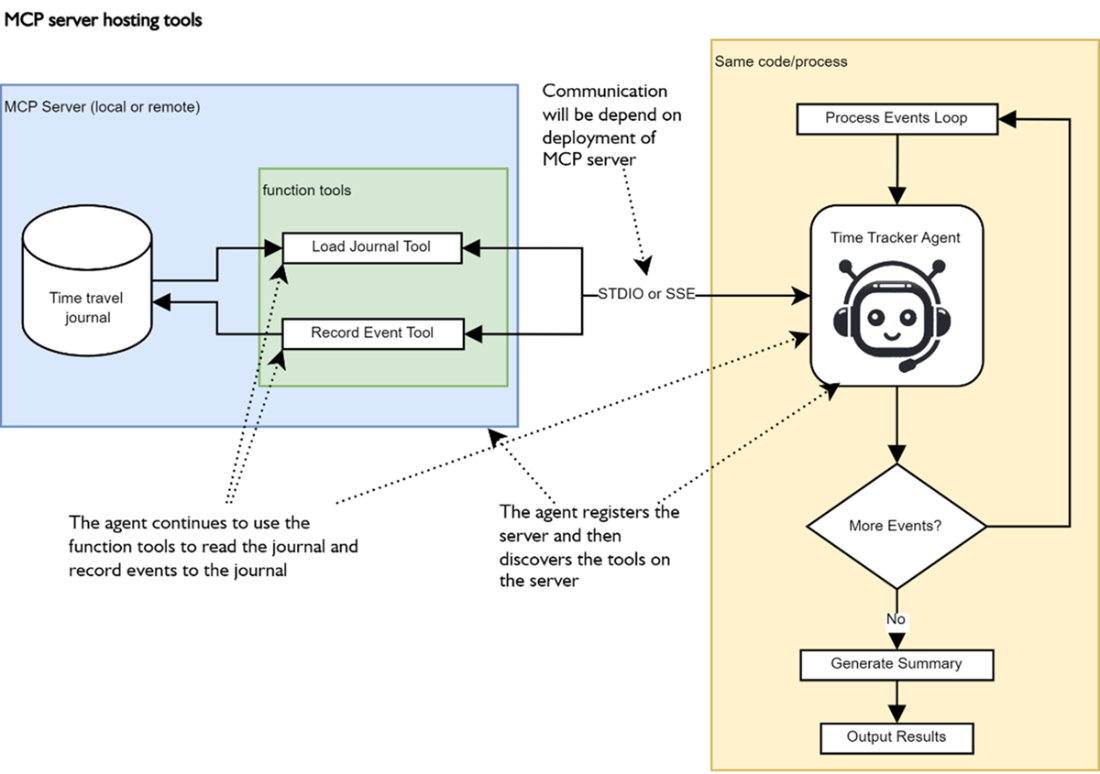
The separation of tools from the agent into a standalone MCP server that could be hosted locally or remotely and access through STDIO (local) or SSE (remote). Now the agent registers the MCP server instead of individual tools and then internally discovers the tools the server supports and how to use those tools.
Summary
- MCP = “USB-C for LLMs & agents.” A JSON-RPC-2.0 spec that erases bespoke glue code for tools, data sources, and even other agents.
- MCP solves fragmentation (multiple tool schemas), brittle data access, ad-hoc orchestration, and uneven security by giving every capability a uniform interface.
- MCP supports three components: Tools (actions), Resources (data/objects), and Prompts (re-usable templates). Agents can treat any of them as callable verbs.
- MCP Architecture is in 3 parts: MCP Client, Server, and the Service/Resource it fronts. An agent is just one kind of client.
- STDIO – sub-process, zero-latency, single caller (great for local development).
- SSE – HTTP + Server-Sent Events, multi-client, cloud-friendly. Switching is literally a constructor swap.
- MCP is not just for tools/actions but can support the other functional layers (Reasoning & Planning, Knowledge & Memory, Evaluation & Feedback)
- MCP can be deployed using a mixture of patterns: Local, remote, or hybrid — mix and match to keep sensitive operations local while sharing heavy APIs remotely.
- The MCP Inspector gives a live, clickable view of any server—perfect for debugging tool schemas and outputs before wiring agents to them.
- MCP reference servers are available for use or inspection and include: filesystem, brave-search, google-calendar, github, etc.—all installable with a single npx or mcp run.
- Agents themselves can be wrapped as servers, turning an entire reasoning pipeline into a reusable, strongly typed tool.
- Typed Pydantic I/O flows end-to-end, eliminating fragile string parsing in multi-agent chains.
- MCP enables LEGO-style composition of agent systems—each block isolated, testable, and instantly swappable without touching the others.

 AI Agents in Action, Second Edition ebook for free
