This chapter introduces Dask-ML, the parallel machine learning layer of Dask that mirrors the Scikit-learn API, letting practitioners scale familiar workflows from a laptop to a cluster. Building on earlier data preparation with Dask Bags and DataFrames, it frames a practical goal: train a sentiment classifier on the Amazon Fine Foods Reviews to predict positive vs. negative sentiment without relying on the numeric review score. The narrative echoes the 80/20 reality of data science—most effort goes into preparation—then shows how Dask-ML fits alongside Dask Arrays and DataFrames to make model training and evaluation efficient and scalable.
The end-to-end pipeline starts by labeling reviews via star ratings, then tokenizing and removing stopwords to build features. To keep the problem tractable, the text is vectorized using a binary presence/absence scheme over the top 100 most frequent tokens. These vectors live in a Dask Bag and are transformed into Dask Arrays by concatenating partitioned NumPy arrays, then rechunked and persisted to Zarr for efficient I/O. With the data ready, a train/test split is created and a Dask-ML logistic regression model is fit and scored, achieving roughly 80% accuracy on held-out data. As a comparison, a Bernoulli Naive Bayes model from Scikit-learn is trained in parallel using Dask-ML’s Incremental wrapper (which leverages partial_fit); it performs slightly worse than logistic regression on this task.
Model assessment and improvement follow a champion–challenger approach, using built-in scoring for objective comparisons and hyperparameter tuning via GridSearchCV. The grid search explores penalty types (L1/L2) and regularization strength (C), parallelizing combinations across workers; in this case, the best settings roughly match the defaults, but the method generalizes to broader searches and other algorithms. Finally, the chapter shows how to persist artifacts: store large arrays with Zarr and serialize trained models with dill/pickle for deployment on lightweight systems. The overall takeaway is a reproducible, scalable pattern for feature construction, model training, validation, tuning, and persistence using Dask and Dask-ML with minimal changes to familiar Scikit-learn code.
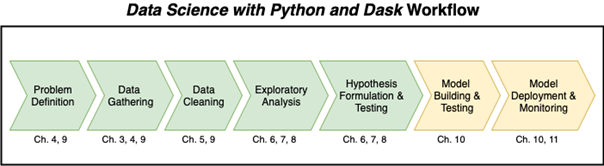
Having thoroughly covered data preparation, it’s time to move on to model building
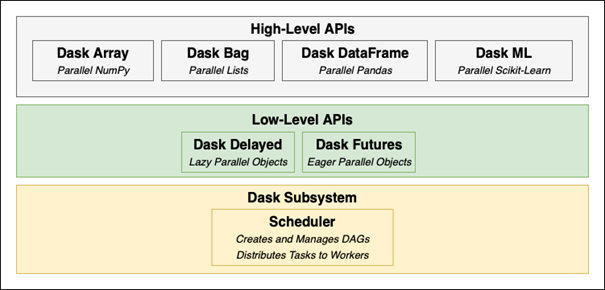
A review of the API components of Dask
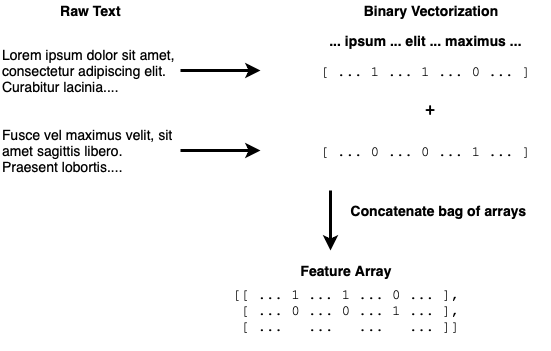
An example of binary vectorization
Vectorizing the raw data into a bag of arrays, then concatenating to a single array
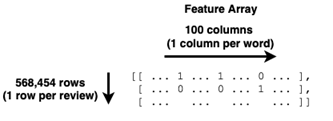
The shape of the feature array
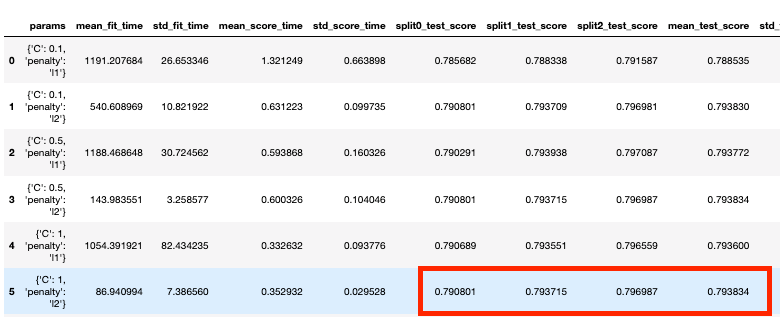
The GridSearchCV results
Summary
In this chapter you learned
Binary vectorization is used to relate the existence of a word in a chunk of text to some predictor (e.g. sentiment)
Machine learning uses statistical and mathematical methods to find patterns that relate features (inputs) to predictors (outputs).
Data should be split into training and testing sets to avoid overfitting.
When trying to decide which model to use, select some error metrics and use the champion-challenger approach to objectively find the best model based on your selected metrics.
GridSearchCV can be used to automate the selection and tuning processes of your machine learning models.
Trained machine learning models can be saved using the dill library in order to reuse later to generate predictions.
FAQ
What is Dask-ML and how does it relate to Scikit-learn?Dask-ML brings Scikit-learn’s APIs to distributed and parallel computing. If you know Scikit-learn, Dask-ML will feel familiar: you get estimators like LogisticRegression, model selection tools (train_test_split, GridSearchCV), and wrappers that let you scale many Scikit-learn models across Dask workers. In short, it parallelizes common ML workflows while keeping the Scikit-learn interface.How do I prepare text data for modeling with Dask?Typical steps shown in the chapter:
- Tokenize review text (e.g., with NLTK’s RegexpTokenizer) and lowercase it.
- Remove stopwords (NLTK list plus domain-specific terms such as “amazon”, “http”).
- Build a vocabulary (corpus) and represent each review with binary vectorization: for each vocab word, set 1 if present in the review, else 0.
- Create targets (e.g., sentiment: positive=1, negative=0). This yields feature vectors and labels suitable for Dask-ML.Why limit the vocabulary to the top-N words for binary vectorization?Using the entire corpus can create extremely wide arrays (hundreds of thousands of columns), which:
- Increases memory and storage requirements.
- Slows training and I/O.
Choosing the top-N most frequent tokens (e.g., 100 or 1,000) keeps arrays compact, speeds up experimentation, and is easy to adjust later. You can always scale N up when resources allow or if accuracy gains justify it.How do I convert a Dask Bag of vectors into a single Dask Array efficiently?Instead of going Bag → DataFrame → Array, the chapter reduces directly to an Array:
- Map each feature vector (NumPy array) to a 1-by-N Dask Array.
- Use a custom reduction that concatenates arrays within each partition, then concatenates the partition-level arrays into a final (rows, features) Dask Array.
This avoids DataFrame overhead with many columns and leverages Dask’s lazy evaluation for efficiency.Why write arrays to Zarr, and how should I pick chunk sizes?Zarr is a chunked, on-disk array format that Dask reads/writes efficiently. Rechunk before writing to avoid producing one file per tiny chunk. Guidelines:
- Aim for chunk sizes that yield 10 MB–1 GB per chunk to reduce file overhead.
- In the chapter, the feature array was rechunked to 5,000 rows per chunk, producing about 100 files—far fewer than one file per row.How do I train a logistic regression model with Dask-ML and ensure reproducibility?Steps:
- Split data with train_test_split and set random_state for a repeatable split.
- Fit LogisticRegression on the training set.
- Score on the test set. Because many Dask-ML methods are lazy, wrap operations in ProgressBar and use compute() where needed.
Setting random_state ensures consistent comparisons across model runs.How is model accuracy measured here, and do I need compute() when scoring?For classifiers, score returns accuracy (fraction of correct predictions between 0 and 1). In Dask-ML estimators (e.g., LogisticRegression), many operations are lazy, so scoring typically requires compute(). For wrapped Scikit-learn estimators via Incremental, score is eager and returns a Python float directly.How can I use Scikit-learn estimators (like Naive Bayes) with Dask?Use dask_ml.wrappers.Incremental with estimators that implement partial_fit:
- Create the Scikit-learn estimator (e.g., BernoulliNB).
- Wrap it with Incremental and call fit, providing the list of classes (e.g., [0, 1]) if required.
This streams data in batches across workers, enabling parallel training without re-implementing the algorithm.How do I tune hyperparameters at scale with GridSearchCV in Dask-ML?Wrap an estimator with GridSearchCV and pass a parameter grid dict (e.g., penalty ∈ {l1, l2}, C ∈ {0.5, 1, 2}). Dask distributes model fits for each parameter combination across workers. Tips:
- Keep the grid manageable—GridSearchCV tries every combination.
- Inspect cv_results_ (e.g., in a Pandas DataFrame) to compare scores and timings.
- Use the champion–challenger approach: establish a baseline, then try challengers with tuned hyperparameters and/or different algorithms.How do I persist and load trained models, and what should I watch out for?Serialize with dill (or pickle) and save to disk; later, load and use predict without retraining. Considerations:
- The loading environment must have the same libraries and versions used to create the model (e.g., Dask, Scikit-learn).
- Binary files should be read/written in binary mode.
- This workflow supports training on powerful clusters, saving the model (e.g., to S3), and serving predictions on lighter-weight machines.
pro $24.99 per month
access to all Manning books, MEAPs, liveVideos, liveProjects, and audiobooks!


 Data Science with Python and Dask ebook for free
