This chapter introduces Dask through a pragmatic, data-science-focused tour of its core ideas: computations are represented as directed acyclic graphs (DAGs), executed lazily, and scaled from a laptop to clusters with the same code. Using an NYC Parking Tickets dataset as a running example, it shows how high-level collections (like Dask DataFrames) map familiar Pandas-like syntax into parallel task graphs, and how to inspect or diagnose those graphs. Along the way, it previews practical tools you’ll use repeatedly—graph visualization, progress diagnostics, and persistence—to make large workloads both understandable and efficient.
The walkthrough begins with Dask DataFrames: reading CSV files produces metadata rather than eager data samples, highlighting how Dask infers dtypes via sampling and partitions large files into manageable chunks processed in parallel. Simple operations such as counting missing values build progressively larger DAGs without executing until compute() is called; results can be monitored with a ProgressBar. The example converts missing counts to percentages, uses the output to drop sparse columns, and demonstrates how Pandas and Dask objects interoperate because each partition is a Pandas DataFrame. To avoid recomputing long transformation chains, persist() caches intermediate results across partitions, dramatically speeding up iterative, exploratory work.
Stepping down to the Delayed API, the chapter shows how small Python functions become DAG nodes, how list comprehensions create parallel branches, and how chaining transformations (add, multiply, sum) grows graphs that can be visualized with graphviz. Persisting intermediate results simplifies downstream graphs and reduces recomputation. Finally, it explains how the central scheduler executes these DAGs: tasks are assigned dynamically, data locality is favored to minimize network traffic, and distributed filesystems (such as S3 or HDFS) help keep data close to workers. Understanding these mechanics—lazy evaluation, partitioned execution, persistence, and locality—equips you to reason about performance and diagnose bottlenecks as your analyses scale.
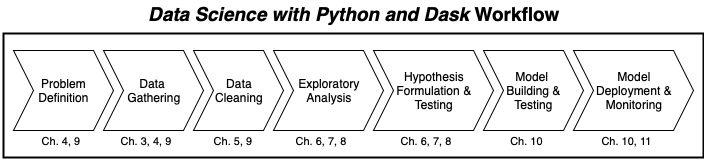
Our workflow, at a glance, in Data Science with Python and Dask
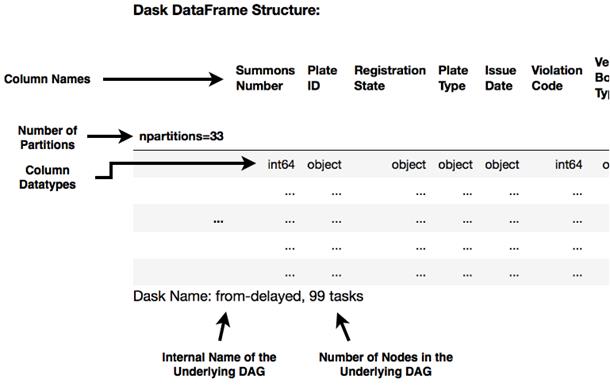
Inspecting the Dask DataFrame
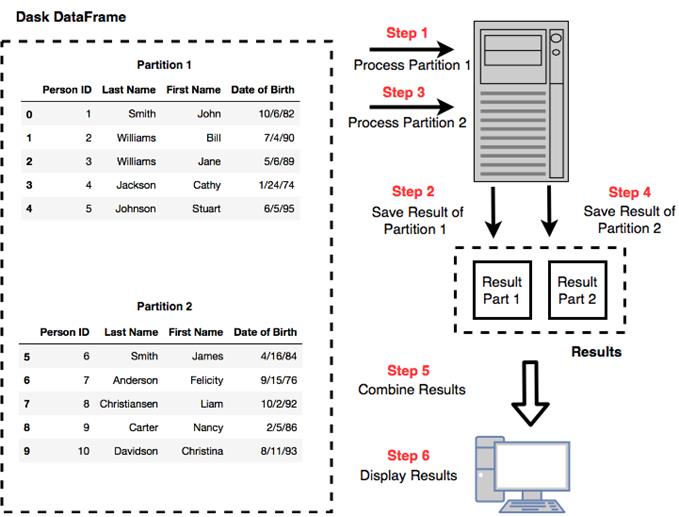
Dask splits large data files into multiple partitions and works on one partition at a time
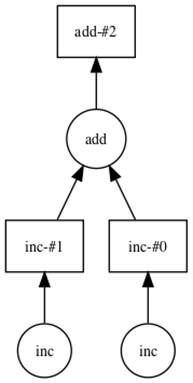
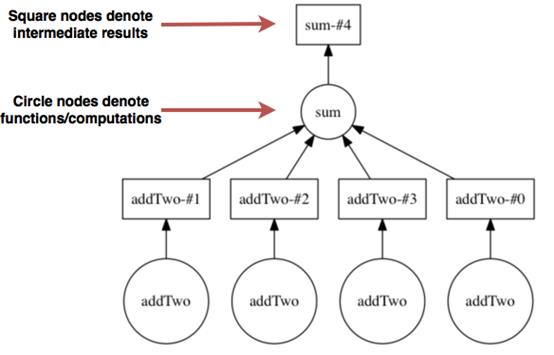
A visual representation of the DAG produced in Listing 2.6.
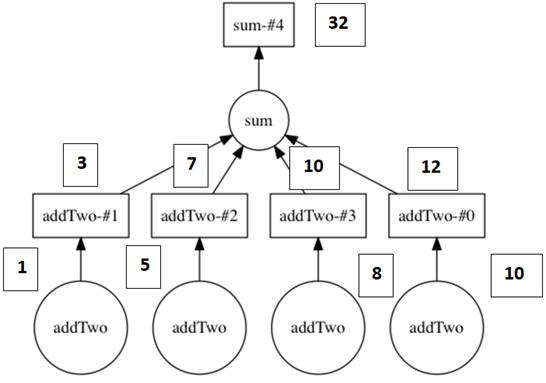
The directed acyclic graph representing the computation in Listing 2.7
The DAG from Figure 2.5 with the values superimposed over the computation.
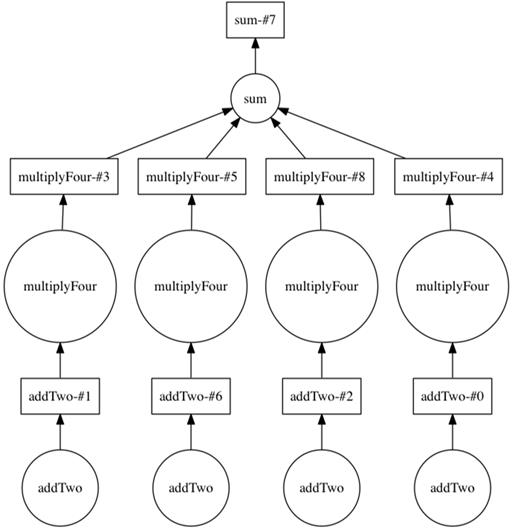
The DAG including the multiply four step
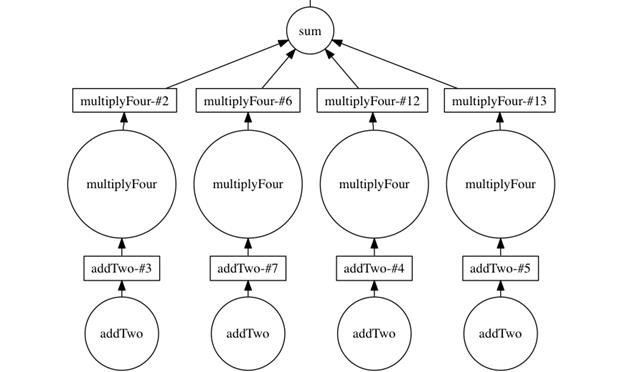
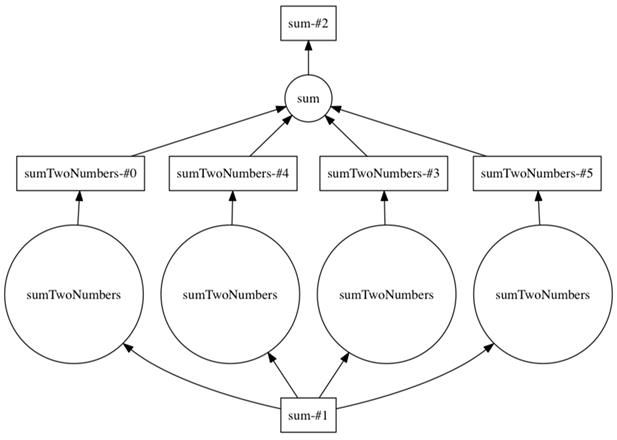
The DAG generated by Listing 2.9
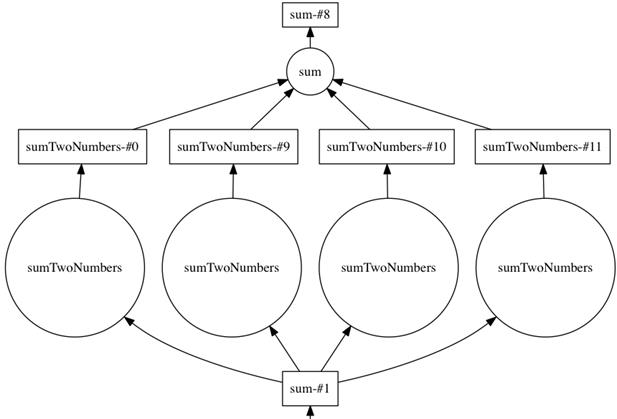
The DAG generated by Listing 2.10
The DAG generated by Listing 2.11
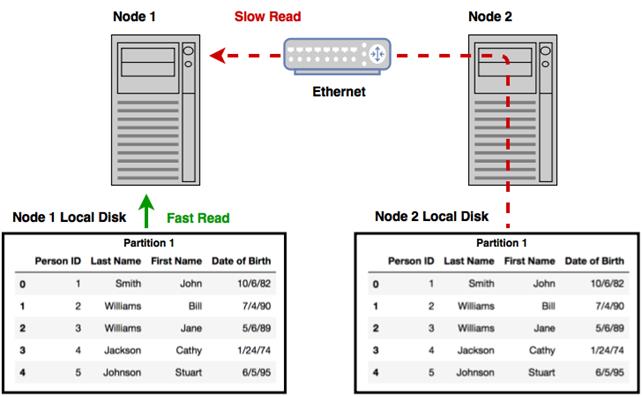
Reading data from local disk is much faster than reading data stored remotely
Summary
In this chapter you learned
Computations on Dask DataFrames are structured by the task scheduler using DAGs.
Computations are constructed lazily, and the compute method is called to execute the computation and retrieve the results.
You can call the visualize method on any Dask object to see a visual representation of the underlying DAG.
Computations can be streamlined by using the persist method to store and reuse intermediate results of complex computations.
Data locality brings the computation to the data in order to minimize network and IO latency.
FAQ
How does Dask’s DataFrame API differ from Pandas in practice?Dask mirrors much of Pandas’ syntax but executes lazily and on partitioned data. Instead of loading a whole dataset into memory, Dask splits it into many small Pandas DataFrames (partitions) and builds a task graph to process them in parallel or sequentially.Why do I see only metadata when I print a Dask DataFrame?Dask defers computation. Inspecting a Dask DataFrame shows schema-like metadata (column names, inferred dtypes, number of partitions, and task count) rather than actual rows, because the data isn’t loaded or computed until you explicitly request it.How does Dask infer column dtypes, and what are best practices to avoid surprises?Dask samples the data to infer dtypes, which can miss rare anomalies. To avoid downstream errors, explicitly set dtypes when reading data or use a format like Parquet that stores schema, improving reliability and performance.What are partitions and tasks in Dask, and how are they created when reading files?Partitions are chunked subsets of your data (each is a small Pandas DataFrame). Reading a large CSV creates a task graph where each partition typically has tasks to read bytes, split into blocks, and construct the DataFrame. For example, ~33 partitions might produce ~99 tasks (about 3 per partition).What does “lazy computation” mean, and when should I call compute()?Lazy computation means operations build a DAG describing the work but don’t execute immediately. Call .compute() to materialize results (e.g., returning a Pandas object) after composing your transformations.When should I use persist() instead of compute()?Use .persist() to execute and cache an intermediate Dask collection in memory across partitions, keeping it as a Dask object for reuse. Use .compute() to get a final in-memory result (like a Pandas Series/DataFrame). Persisting reduces repeated work and can shrink subsequent DAGs.How can I visualize the task graph (DAG) of a Dask computation?Call .visualize() on Dask collections (DataFrame, Series, Array, Bag) or Delayed objects. With graphviz installed, Dask renders a diagram showing tasks (circles), intermediate results (squares), and dependencies, which helps debug and understand execution.What are Dask Delayed objects and when are they useful?Delayed wraps arbitrary Python functions and their arguments to build custom task graphs. They’re ideal for parallelizing pure-Python workflows, composing fine-grained pipelines, and learning/visualizing how DAGs form before scaling up to collections.Can I mix Pandas objects with Dask DataFrames?Yes. Because each Dask partition is a Pandas DataFrame, you can pass Pandas objects (e.g., a Pandas Series of column names to drop) into Dask operations. In distributed runs, Dask broadcasts such small objects to workers.How does Dask’s scheduler assign work, and why does data locality matter?A centralized scheduler dynamically assigns tasks to workers based on load, dependencies, and where data lives, aiming to minimize data movement. Storing data in a distributed filesystem (e.g., S3, HDFS) lets workers read locally, avoiding network bottlenecks and improving performance.
pro $24.99 per month
access to all Manning books, MEAPs, liveVideos, liveProjects, and audiobooks!

 Data Science with Python and Dask ebook for free
