This chapter moves from core ideas to hands-on ingestion, showing how to bring real-world datasets into Dask DataFrames for analysis of NYC Parking Tickets. It acknowledges the messiness of “data at rest” and reviews how Dask structures data as many partitioned pandas DataFrames executed via a task graph and scheduler. The chapter surveys practical entry points you’ll encounter on the job: delimited text files, relational databases, distributed filesystems such as HDFS and S3, and the Parquet columnar format.
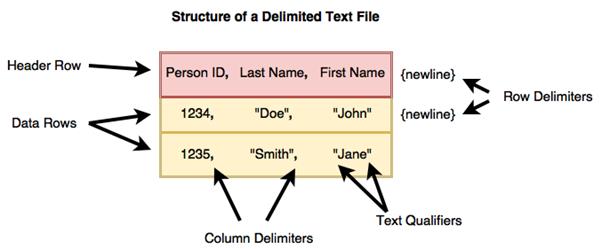
The text begins with delimited files (especially CSVs), explaining row and column delimiters, headers, and text qualifiers, then demonstrates reading multiple years of ticket data. Because schemas changed across years, it extracts the common columns before combining. A central lesson is that automatic dtype inference can misclassify columns—especially with many missing values—so you should define explicit schemas using NumPy dtypes. The chapter outlines strategies to infer or confirm types (guess-and-check, manual sampling), cautions about NaN forcing floats, and urges choosing the smallest safe types for efficiency. With a finalized schema, it reads many files at once using wildcards and limits columns with a selector, noting memory considerations when peeking at rows.
Next, it covers loading from SQL systems via SQLAlchemy/ODBC with read_sql_table, highlighting assumptions around dtype inference, partitioning by a numeric or datetime index (or specifying partitions/boundaries), selecting subsets of columns, and choosing database schemas—plus the ability to pass pandas options through keyword arguments. It then explains reading from distributed filesystems, why data locality matters, and how simple path prefixes enable HDFS and S3 access once the appropriate connectors are installed. Finally, it introduces Parquet: a typed, columnar format that improves IO and compression and is typically read from a directory of files, with optional column and index selection. Together, these patterns equip you to reliably load large, heterogeneous datasets into Dask as a foundation for downstream cleaning and analysis.
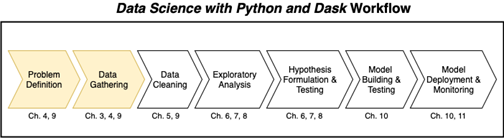
The Data Science with Python and Dask workflow
The structure of a delimited text file
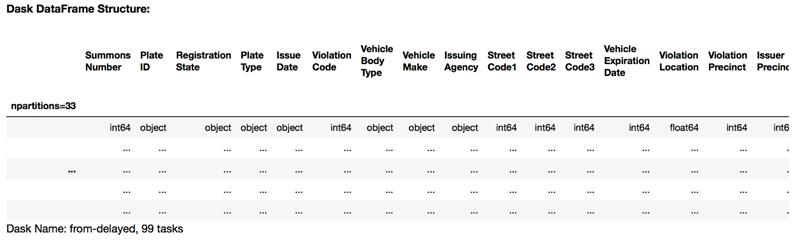
The metadata of the fy17 DataFrame
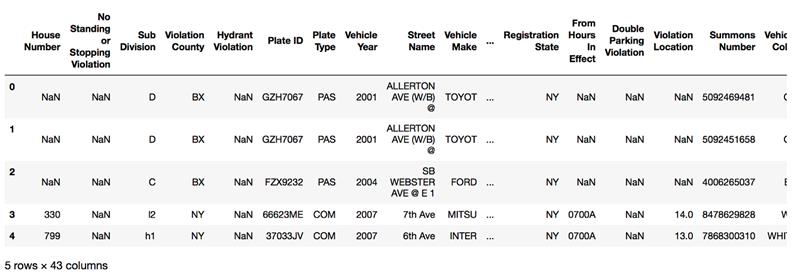
The first five rows of the fy17 DataFrame using the common column set
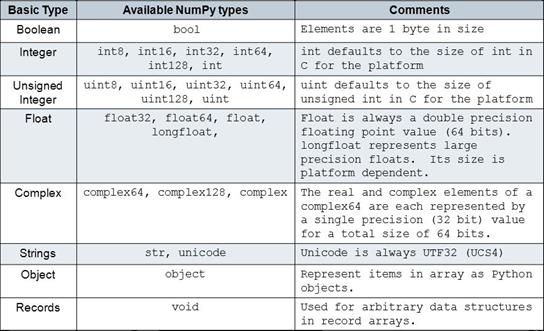
NumPy datatypes used by Dask
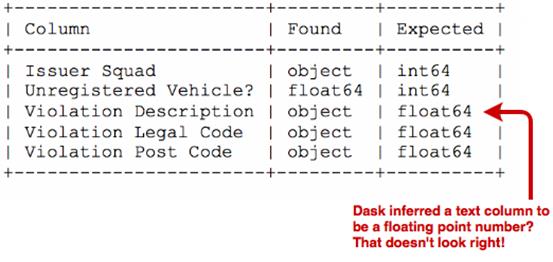
A Dask error showing mismatched datatypes
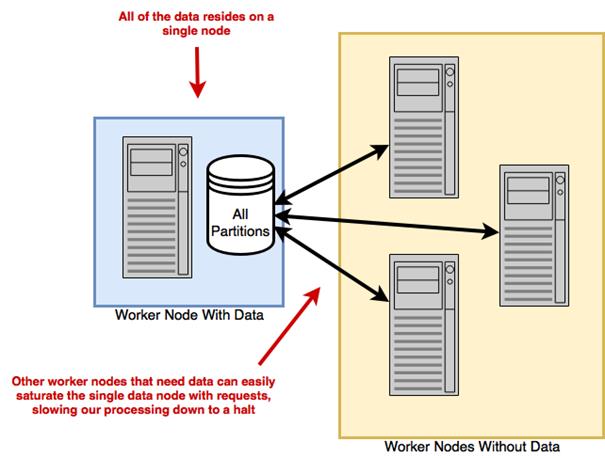
Running a distributed computation without a distributed filesystem
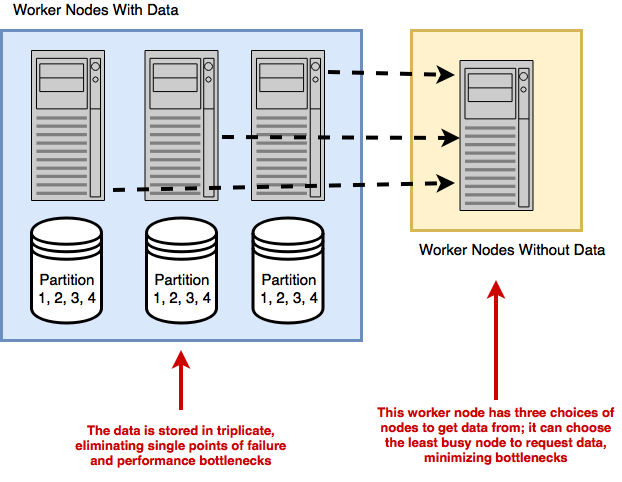
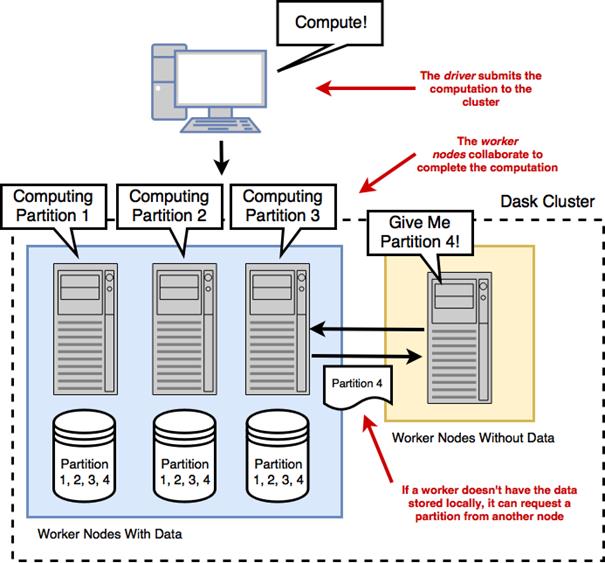
Running a distributed computation on a distributed filesystem
Shipping computations to the data
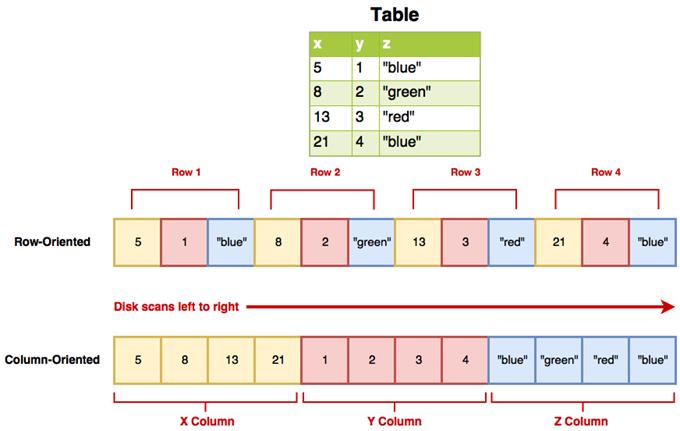
The structure of Parquet compared with delimited text files
Summary
In this chapter you learned
Inspecting the columns of a DataFrame can be done with the columns attribute.
Dask’s data type inference shouldn’t be relied on for large datasets. Instead, you should define your own schemas based on common NumPy datatypes.
Parquet format offers good performance because it’s a column-oriented format and highly compressible. Whenever possible, try to get your dataset in Parquet format.
FAQ
How do I load one or many CSV files into a single Dask DataFrame?You can use dd.read_csv with a file path or a wildcard. Dask assumes a header row by default and splits files into partitions with a default 64 MB blocksize. Example: data = dd.read_csv('nyc-parking-tickets/*.csv'). Use dtype to set column types and usecols to select columns. The wildcard pattern is especially useful when a dataset is split across many files or stored on distributed filesystems.How can I avoid dtype inference errors when reading CSVs?Provide an explicit schema via the dtype argument (a dict mapping column names to NumPy dtypes). Inference can fail when columns have many missing values or mixed content; blanks are parsed as NaN (a float), which can mislead sampling. A practical workflow is to first load all columns as strings, profile a few columns (for example with .unique().head()), then refine types using the smallest appropriate NumPy dtypes. Remember that standard NumPy integer dtypes cannot store NaN, so columns with missing values must use a float dtype (or stay as strings) unless you adopt pandas’ nullable dtypes.What’s the best way to find columns common to multiple CSV files before combining them?Convert each DataFrame’s columns to sets and compute their intersection. For example, build a list of set(df.columns) and reduce with set.intersection to get common_columns. Then select only those columns from each DataFrame (df[common_columns]) before concatenating or load once with usecols=common_columns in dd.read_csv. This minimizes missing values created by schema drift across years.Why did Dask classify my text column as float?Blank fields are parsed as NaN, and NaN is a floating-point value. If Dask’s sampling mostly sees NaN in a column, it may infer a float dtype even if the column really contains text. Fix this by explicitly setting dtype={'Your Column': 'object'} (or np.str) when calling dd.read_csv.How do I read tables from a relational database into Dask?Use dd.read_sql_table with a SQLAlchemy connection string and an index column: data = dd.read_sql_table('table', conn_str, index_col='id'). Dtypes are inferred from a small sample, so you may still need to adjust types later. If index_col is numeric or datetime, Dask infers partition boundaries (default target ~256 MB per partition). For non-numeric indexes, specify npartitions or explicit divisions. You can also restrict columns with the columns argument and choose a non-default database schema via schema='your_schema'.How should I partition a SQL read when the index is a string?Provide either npartitions for evenly sized splits or divisions for custom boundaries. With divisions, Dask uses half-closed intervals sorted by the index type (for strings, lexicographically), so ranges are (prev, boundary]. Example: divisions=['Blue','Red','Yellow'] yields partitions covering strings <= 'Blue', (Blue, Red], and (Red, Yellow]. Choose boundaries that produce balanced partitions.What are the pros and cons of local files vs HDFS/S3 for distributed computing?Local files can bottleneck a cluster because one node must ship partitions over the network to all workers. Distributed filesystems (HDFS, S3) spread data across machines, improving throughput and resilience; computation can often be scheduled where the data resides (data locality) with HDFS. S3 does not execute code on storage nodes, so data always moves to workers. Use hdfs:// or s3:// paths and install the relevant clients (hdfs3 for HDFS; s3fs and boto config for S3) on every worker.Why and how should I use Parquet with Dask?Parquet is a columnar, typed, and compressed format that speeds up IO, aggregations, and shuffles by reading only needed columns and reducing data movement. Install pyarrow (recommended) or fastparquet, plus optional compression libraries (e.g., snappy). Read with dd.read_parquet('path/to/dataset_dir'); Parquet datasets are directories of files. You can filter columns and select an index at read time (columns=[...], index='col').What’s the risk of calling head() or fetching many unique values?head() materializes rows into the client’s RAM. Large requests can cause out-of-memory errors on the driver. When profiling types or categories, sample a small number of unique values with .unique().head(n) rather than computing all uniques. Use .compute() cautiously on large or high-cardinality columns.
What cluster-wide dependencies and credentials do I need for databases, HDFS, and S3?Every Dask worker must have the same connectivity and libraries: for SQL, install SQLAlchemy, pyodbc, and the appropriate ODBC driver on each node; ensure network access to the DB. For HDFS, install hdfs3. For S3, install s3fs and configure AWS credentials (via environment variables or config files recognized by boto) on each worker. Avoid hard-coding secrets in your code; rely on environment/config-based discovery.
pro $24.99 per month
access to all Manning books, MEAPs, liveVideos, liveProjects, and audiobooks!

 Data Science with Python and Dask ebook for free
