1 Welcome to Docker
Docker is introduced as an open source tool that makes modern software packaging, distribution, and execution simple by default through Linux containers. Rather than being a language or framework—or a hardware virtualization technology—it provides a consistent, CLI-driven way to build, ship, and run applications as isolated processes that share the host kernel. The chapter shows this with a “Hello, World” example that pulls an image, creates a container, runs a command, and then stops, illustrating how images (the shippable units) become containers (the runnable units) via registries. It contrasts containers with virtual machines, emphasizing faster startup, lower overhead, and complementary use with VMs on macOS, Windows, and in the cloud.
The narrative frames Docker as a practical antidote to dependency conflicts, inconsistent installations, and drift across machines. By isolating applications and their dependencies per container, teams get cleaner systems, repeatable deployments, and trusted removal. Portability improves because the same image can run in development, CI, and production, boosting confidence and iteration speed. Security is strengthened by default isolation (namespaces, cgroups, capability drops, and security modules), limiting the blast radius of misbehaving or malicious software. Operationally, containers start quickly and scale efficiently; development teams can version, share, and update complete environments; and system administrators gain a declarative, expressive runtime to control configuration and resource access.
Docker’s importance stems from its clear abstraction for install/run/remove workflows, broad industry adoption, and its app-store-like simplicity that accelerates safe software use across platforms. The chapter advises using containers widely for server and many desktop workloads that suit Linux (or Windows containers on Windows Server), while noting limitations for apps that require full machine access or elevated privileges. It also situates Docker within a larger ecosystem—images, registries, and higher-level tools like Kubernetes for orchestration—encouraging readers to master Docker fundamentals before adopting more complex platforms. Finally, it points to the built-in command help as the fastest path to learn exact syntax and capabilities on any installation.
What happens after running docker run

Running docker run a second time. Because the image is already installed, Docker can start the new container right away.

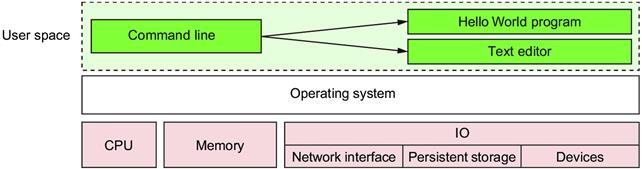
A basic computer stack running two programs that were started from the command line
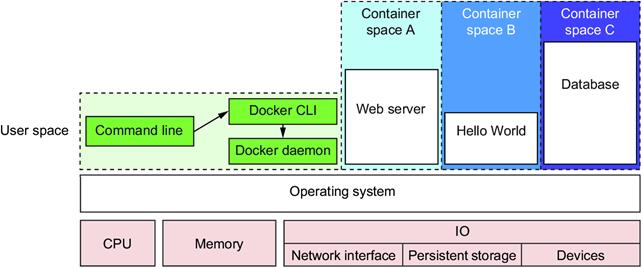
Docker running three containers on a basic Linux computer system
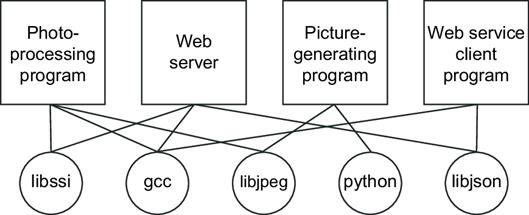
Example programs running inside containers with copies of their dependencies Figure 1.5 Dependency relationships of example programs
Figure 1.5 Dependency relationships of example programs

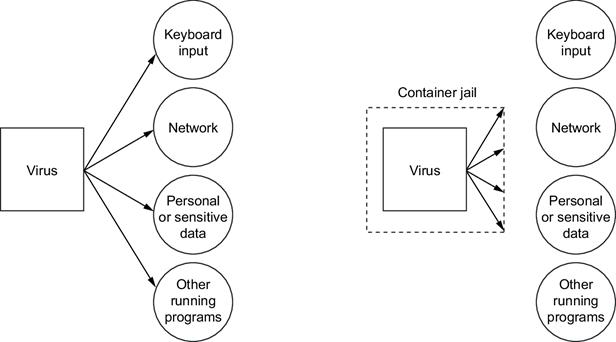
Left: a malicious program with direct access to sensitive resources. Right: a malicious program inside a container.
Summary
This chapter has been a brief introduction to Docker and the problems it helps system administrators, developers, and other software users solve. In this chapter you learned that:
- Docker takes a logistical approach to solving common software problems and simplifies your experience with installing, running, publishing, and removing software. It’s a command-line program, an engine background process, and a set of remote services. It’s integrated with community tools provided by Docker Inc.
- The container abstraction is at the core of its logistical approach.
- Working with containers instead of software creates a consistent interface and enables the development of more sophisticated tools.
- Containers help keep your computers tidy because software inside containers can’t interact with anything outside those containers, and no shared dependencies can be formed.
- Because Docker is available and supported on Linux, OS X, and Windows, most software packaged in Docker images can be used on any computer.
- Docker doesn’t provide container technology; it hides the complexity of working directly with the container software; and turns best practices into reasonable defaults.
- Docker works with the greater container ecosystem; that ecosystem is rich with tooling that solves new and higher-level problems.
- If you need help with a command you can always consult the docker help subcommand.
FAQ
What is Docker, in simple terms?
Docker is an open-source toolset for building, shipping, and running software as containers. It includes a background service (engine/daemon), a command-line interface, and supporting services that package your app and its dependencies into portable images and run them as isolated containers.How are containers different from virtual machines?
Containers share the host operating system kernel and isolate processes using OS features, so they start fast and use fewer resources. Virtual machines emulate hardware and run a full guest OS, which adds overhead and slower startup. The two are complementary—Docker often runs inside a small VM on macOS/Windows and in many cloud setups.How do I run my first container and what happens behind the scenes?
Rundocker run dockerinaction/hello_world. Docker checks for the image locally, pulls it from Docker Hub if missing, creates a container, executes the image’s default command (prints “hello world”), then stops the container when the process exits. Running the command again reuses the cached image but creates a new container each time.What are images, containers, registries, and how do they relate?
- Image: a read-only package of files plus metadata (the “shipping container” for software).- Container: a runnable instance created from an image, with its own writable layer and isolated resources.
- Registry/Index: infrastructure that stores and locates images (e.g., Docker Hub).
You can create many containers from one image; file changes are isolated to each container.
Which problems does Docker help solve?
- Dependency conflicts and “it works on my machine” issues via per-app isolation.- Inconsistent installs and difficult removals through standardized packaging and cleanup.
- Portability across dev, test, and prod (and across OSes via a common Linux base).
- Faster startup and lower resource use than VM-per-app approaches.
- Reduced security blast radius with scoped access to files, networks, and resources.
- Declarative, repeatable, and trustworthy deployments.
When should I use Docker—and when should I avoid it?
Use Docker for server apps (web, databases, proxies), CLI tools, and even some desktop apps; for dynamic scaling; CI/CD; and modeling reproducible dev environments. Avoid it for software that must control the entire host or requires full administrative access, and don’t run untrusted privileged containers. Note: Docker runs Linux apps everywhere and can run Windows apps on Windows Server.How do containers improve security and isolation?
Docker applies Linux features—namespaces (PID, UTS, MNT, IPC, NET, USER), cgroups (resource limits), chroot-like filesystem scoping, capability drops, and security modules (MAC)—to restrict what a process can see and do. This limits the impact of bugs or malicious behavior, though containers are not a complete security solution.How does Docker help development teams and CI/CD?
Teams can version and share identical dev environments, cut onboarding time, and build expressive CI/CD pipelines where tests run against the exact images that go to production. This yields faster iterations, higher confidence in changes, and tighter control over releases.Where does Docker fit in the larger ecosystem (e.g., Kubernetes)?
Docker provides the container runtime, packaging, and distribution. Higher-level tools like Kubernetes orchestrate containers across clusters. Many ecosystem tools integrate with Docker or use its subcomponents (such as runc, libcontainerd, and notary). For most teams, a managed Kubernetes service is the easiest on-ramp once you’ve mastered Docker basics.How do I get help with the Docker command line?
Rundocker help to see commands and general usage. For details on a specific command, use docker help <command> (for example, docker help cp) to view syntax, flags, and examples tailored to your installed version.
 Docker in Action, Second Edition ebook for free
