1 Discovering Docker
Docker is presented as a fast-maturing, standard platform for building, shipping, and running software that streamlines one of the most expensive parts of development: deployment. Where teams once juggled virtual machines, configuration tools, package managers, and tangled dependency webs, Docker unifies the pipeline into a single, portable artifact that runs consistently anywhere Docker is available. It also lets teams wrap existing stacks as-is for easy consumption while retaining visibility into how those containers are built. The chapter targets readers who know the basics and sets out to refresh core ideas before tackling real-world challenges in later sections.
The chapter explains why Docker pays off quickly: it replaces many VM use cases with faster, lighter containers; accelerates prototyping in isolated sandboxes; provides a universal packaging format; and encourages decomposing systems into manageable, composable services. It also enables large-scale network modeling on a single machine, supports full-stack work offline, reduces debugging friction through reproducible environments, and improves documentation of dependencies. By making builds more deterministic, Docker smooths the path to continuous delivery practices. Foundational concepts are clarified: images define what runs, containers are running instances of images, and immutable layers capture filesystem changes efficiently. At the command-line level, common operations include building images, running containers, committing changes, and tagging versions.
A guided example builds and runs a simple to-do web application to illustrate Docker’s workflow. Using a concise Dockerfile, the reader starts from a Node.js base, clones application code, sets the working directory, installs dependencies, exposes the service port, and defines the startup command. The image is then built, tagged for easy reference, and executed as a container with port mapping so it’s reachable at localhost:8000, demonstrating how containers can be stopped, restarted, and inspected to see what changed since instantiation. The chapter closes by showing how Docker’s copy-on-write layering underpins fast startup and compact storage: base, dependency, and app layers are shared across many containers, enabling efficient scaling for development, testing, and production.
Figure 1.1. How Docker has eased the tool maintenance burden
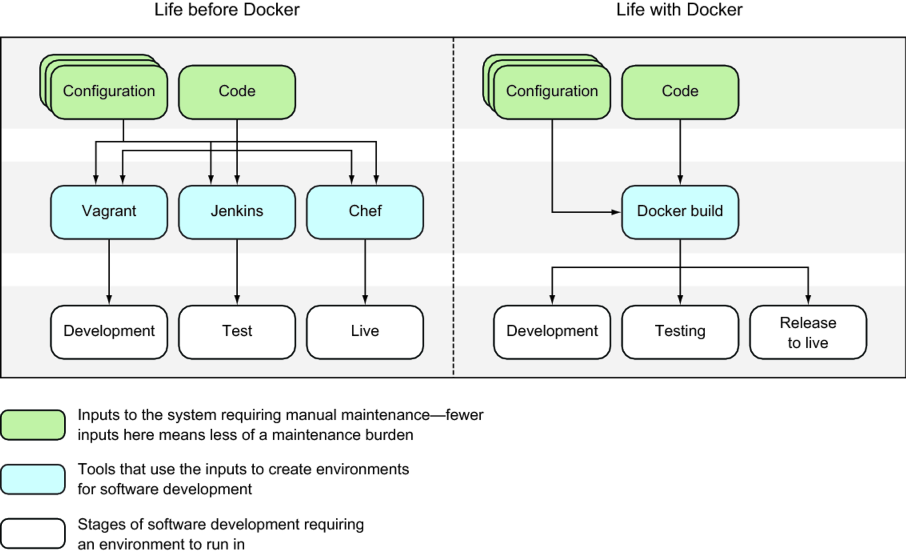
Figure 1.2. Shipping before and after standardized containers

Figure 1.3. Software delivery before and after Docker
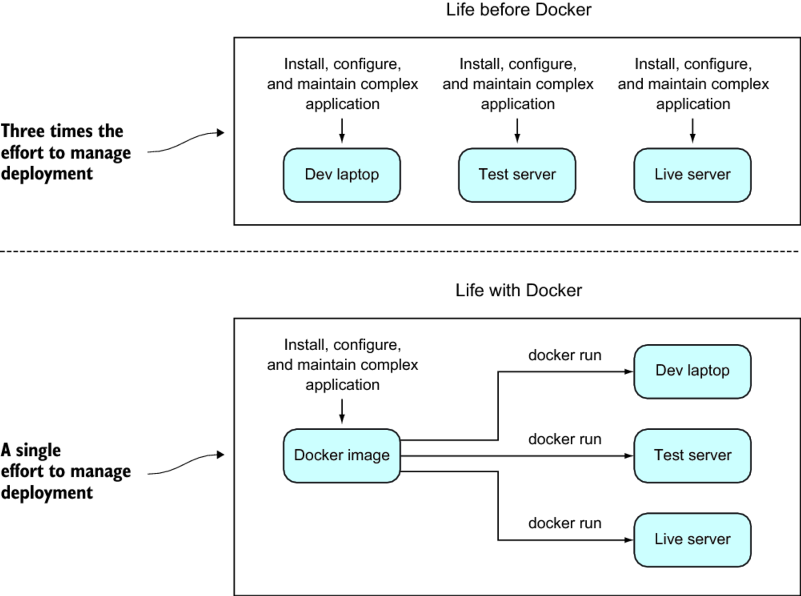
Figure 1.4. Core Docker concepts

Figure 1.5. Docker images and containers
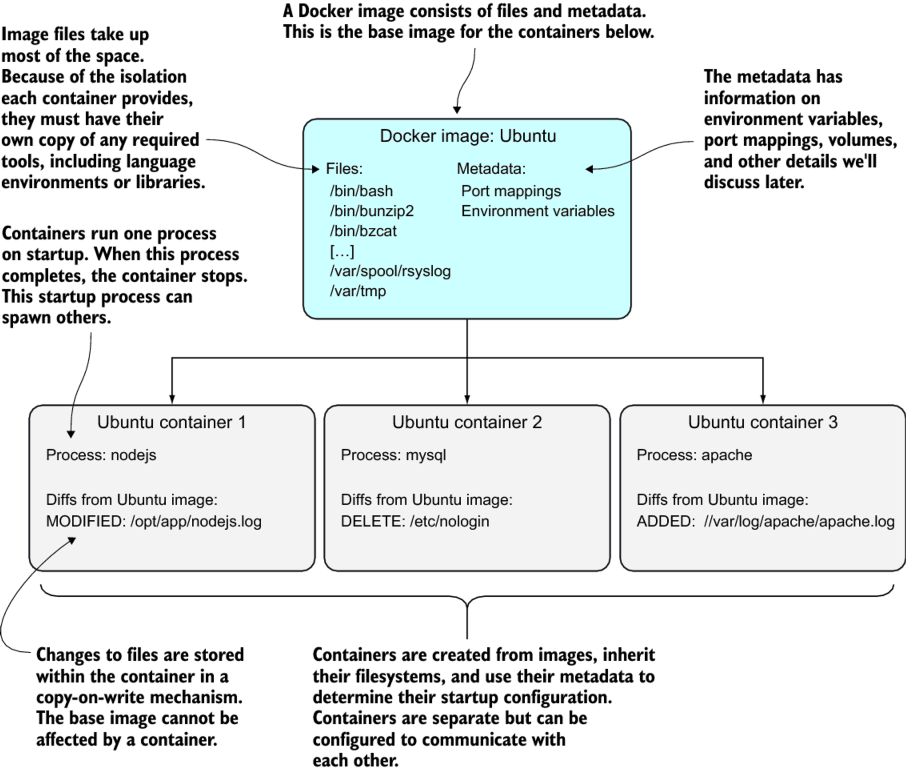
Figure 1.6. Building a Docker application
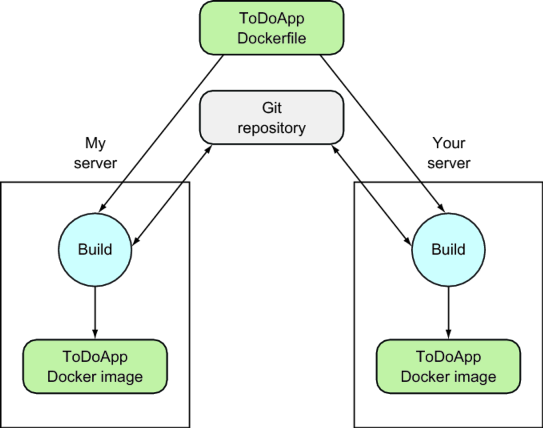
Figure 1.7. Docker build command
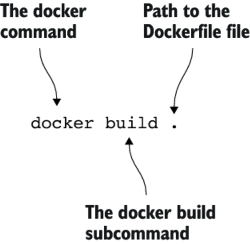
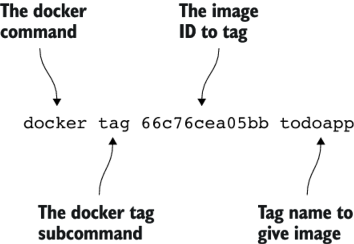
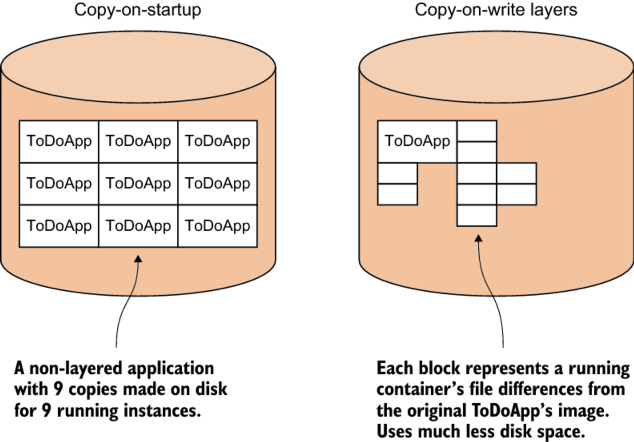
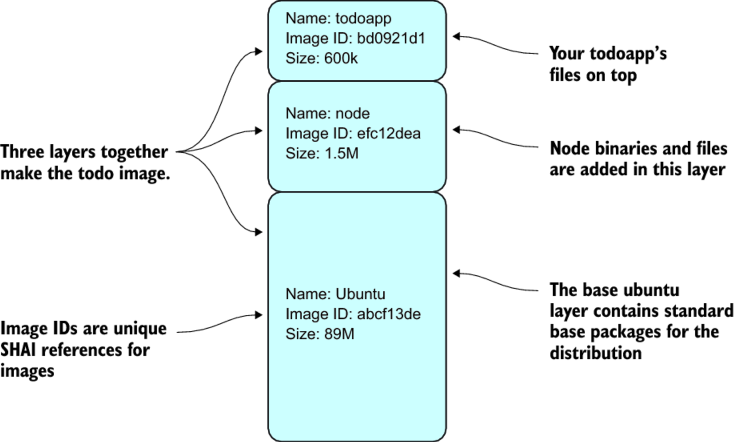
Figure 1.8. The todoapp’s filesystem layering in Docker
Summary
Depending on your previous experience with Docker this chapter might have been a steep learning curve. We’ve covered a lot of ground in a short time.
You should now
- Understand what a Docker image is
- Know what Docker layering is, and why it’s useful
- Be able to commit a new Docker image from a base image
- Know what a Dockerfile is
We’ve used this knowledge to
- Create a useful application
- Reproduce state in an application with minimal effort
Next we’re going to introduce techniques that will help you understand how Docker works and, from there, discuss some of the broader technical debate around Docker’s usage. These first two introductory chapters form the basis for the remainder of the book, which will take you from development to production, showing you how Docker can be used to improve your workflow.
FAQ
What is Docker and why does it matter?
Docker is a platform to build, ship, and run applications consistently across environments. It standardizes delivery so teams can share a common pipeline and avoid re-creating complex, environment-specific setups. The result is faster, more reliable deployments with lower operational cost.What’s the difference between a Docker image and a container?
- Image: a read-only template that defines what will run (files, layers, and metadata).- Container: a running instance of an image with its own writable layer and lifecycle.
Useful analogies: program vs. process, or class vs. object.
What are Docker layers and how does copy-on-write help?
Images are composed of stacked, immutable layers. Containers add a thin writable layer on top. With copy-on-write, data is only copied when modified, so multiple containers share the same underlying layers. This saves disk space and enables very fast startup.When should I use Docker instead of virtual machines?
Use Docker when you care about packaging and running the application, not managing a full guest OS. Containers start faster, are lighter to move, share common layers efficiently, and are easy to script and automate. VMs are better if you must control the entire OS.What practical problems can Docker help me solve?
- Rapid prototyping without disrupting your host- Simple, dependency-free packaging for Linux users
- Enabling a microservices architecture via composable services
- Modeling complex networks on a single machine
- Full‑stack, offline development on a laptop
- Easier debugging and environment reproduction
- Explicit documentation of dependencies and touchpoints
- Smoother continuous delivery (e.g., Blue/Green, Phoenix deployments)
Which Docker commands should I learn first?
- docker build: create an image from a Dockerfile (or context)- docker run: start a container from an image
- docker commit: snapshot a container’s state as a new image
- docker tag: add human-friendly names to image IDs
What are the main ways to create a Docker image?
- By hand: run a container and use docker commit (good for quick POCs)- Dockerfile: declare steps from a base image (most common and repeatable)
- Dockerfile + configuration management tool: use tools like Chef for complex builds
- From scratch + import: start with an empty image and import a tarball (niche use)
What does each instruction in the sample Dockerfile do?
- FROM node: base image with Node.js tools available- LABEL maintainer=...: metadata about who maintains the image
- RUN git clone ...: fetch the to‑do app source code
- WORKDIR todo: set working directory for subsequent steps and container start
- RUN npm install: install app dependencies
- EXPOSE 8000: document the port the app listens on inside the container
- CMD ["npm","start"]: default command when the container starts
How do I build, tag, and run the chapter’s to‑do application?
- Build: docker build -t todoapp .- Run: docker run -it -p 8000:8000 --name example1 todoapp
- View: open http://localhost:8000 in a browser
- Stop foreground app with Ctrl+C, then restart in background: docker start example1
- Inspect file changes since start: docker diff example1

 Docker in Practice, Second Edition ebook for free
