5 Hosting, scaling, and load testing
This chapter moves a RAG chatbot from a single-process prototype to a resilient, production-ready service. It frames statelessness as the guiding principle: any replica should handle any request, with durable data and configuration living outside the process. Containers become the vehicle for this reliability, packaging a consistent runtime that can boot identically on a laptop, an Azure Web App, or Kubernetes. The end goal is a repeatable, observable, and scalable system that survives real traffic rather than just working on a developer’s machine.
Practically, the chapter replaces local SQLite logs with a cloud database for durability, pins dependencies, and builds a slim, fast Docker image while keeping secrets out of the artifact via environment variables. After validating the container locally over WebSockets, the image is pushed to a private container registry and deployed to an Azure Web App with Application Insights enabled. The app’s configuration is injected via environment variables, and GitHub Actions is wired in for CI/CD that runs tests, builds the image, publishes to the registry, and deploys on every push. Small adjustments—like a test-mode flag that returns full answers for integration tests—ensure automated checks stay reliable as streaming behavior remains production-friendly.
To ensure the service performs under load, the chapter adds structured logging and uses Locust to simulate concurrent users against the public endpoint. Real-time logs and telemetry surface bottlenecks and guide targeted fixes: scale the App Service up or out for throughput, raise search service capacity to prevent throttling, and address model rate limits by adjusting quotas or usage patterns. The result is a disciplined loop—deploy, observe, load-test, tune, repeat—so capacity planning, cost control, and reliability are driven by data, turning “git push” into a safe, measurable path to production.
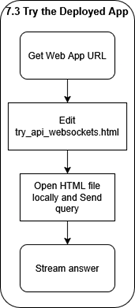
This flowchart shows the key stages of this chapter. We will start by packaging our app as a container, then deploy it to Azure’s app service, then test it remotely. Finally, we will perform load testing using logging and simulated users with Locust.

The RAG container keeps no secrets and writes nothing to its own disk; it simply streams prompts from the browser, fans out to AI Search and OpenAI for retrieval and generation, and drops a JSON record into Cosmos DB for posterity. All configuration arrives at launch via environment variables or a key vault. The dashed line to “Local Disk” drives home the point: local storage is strictly off-limits in a truly stateless service.
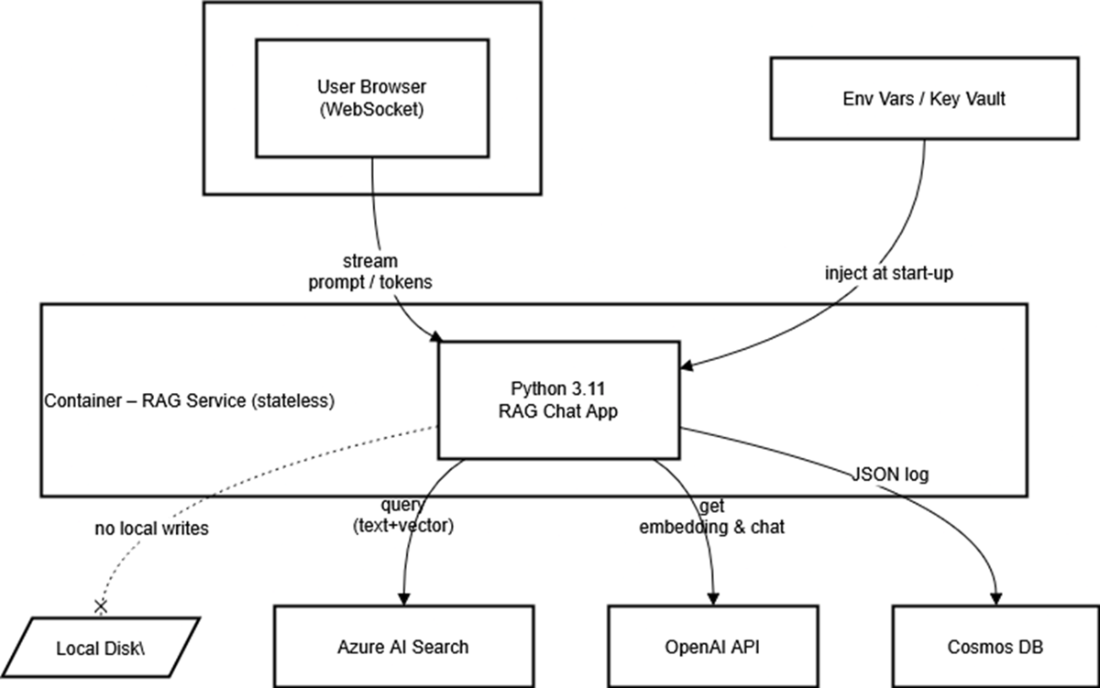
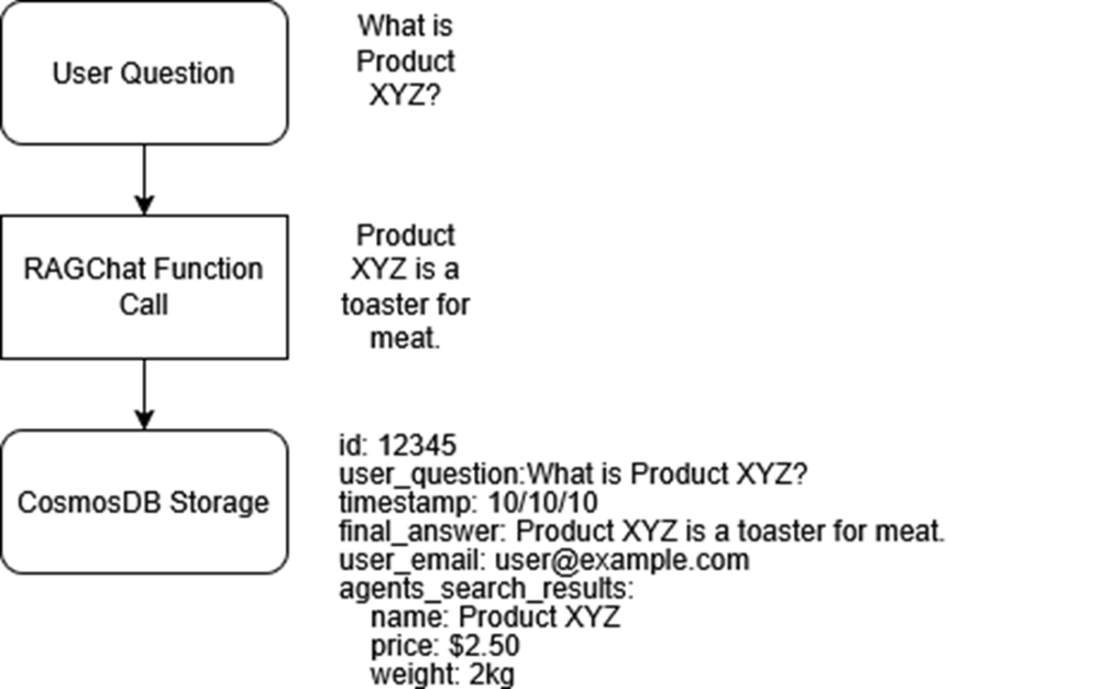
An overview of the new logging path: each answer that streams to the user is also packaged into a JSON document and sent over HTTPS to Cosmos DB, where it can be queried later to debug slow responses, audit model behaviour, or train future ranking tweaks..
In this section, we will get our web app’s URL, add it to our test website, open it, and send a query, then wait for the streaming answer to come back.
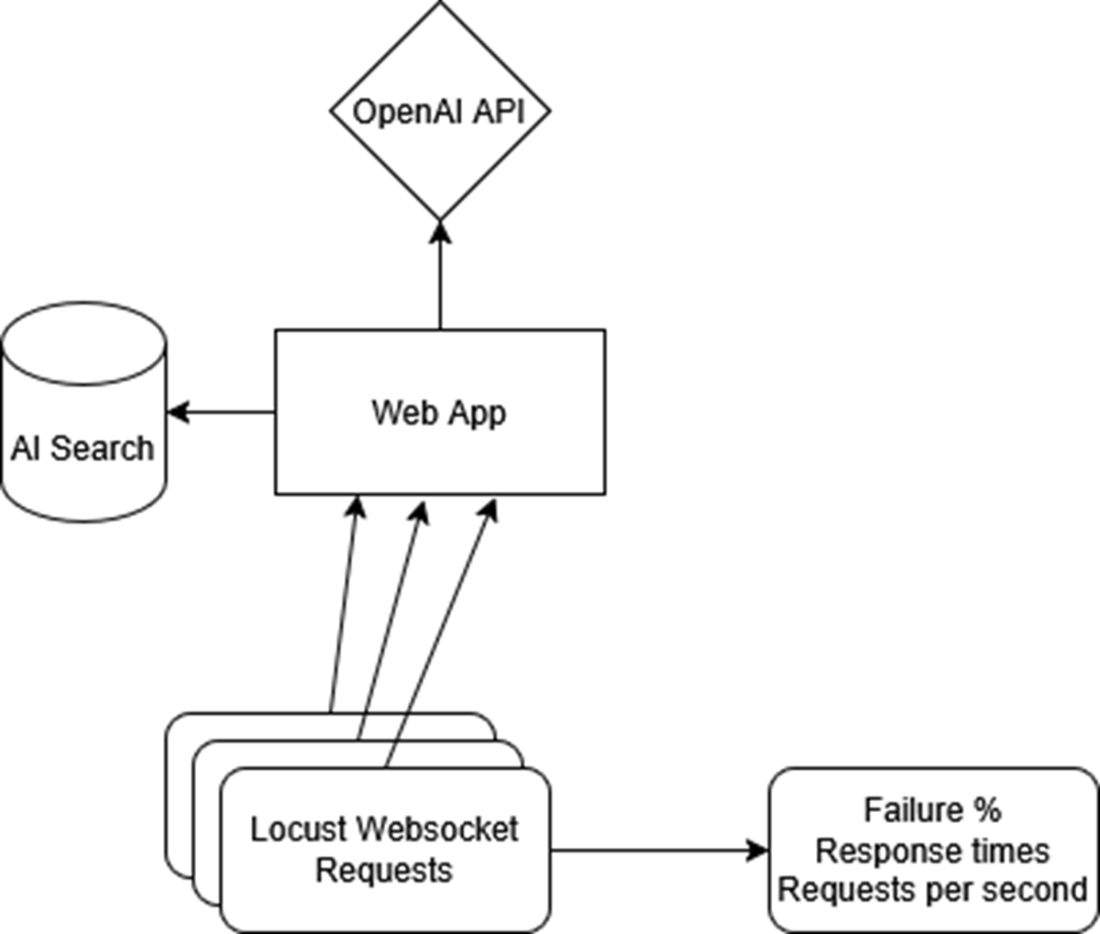
We will add logging to our file to catch any errors, then run Locust to simulate users and cause our app to fail. We will use the Locust dashboard and logs to find bottlenecks so we can fix them.
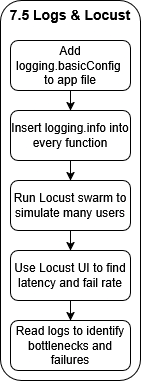
A Locust swarm batters the public Web App endpoint while Application Insights logs every request and latency spike. Those metrics show up in real time, giving you the data needed to nudge the App Service scale slider from one replica to many.
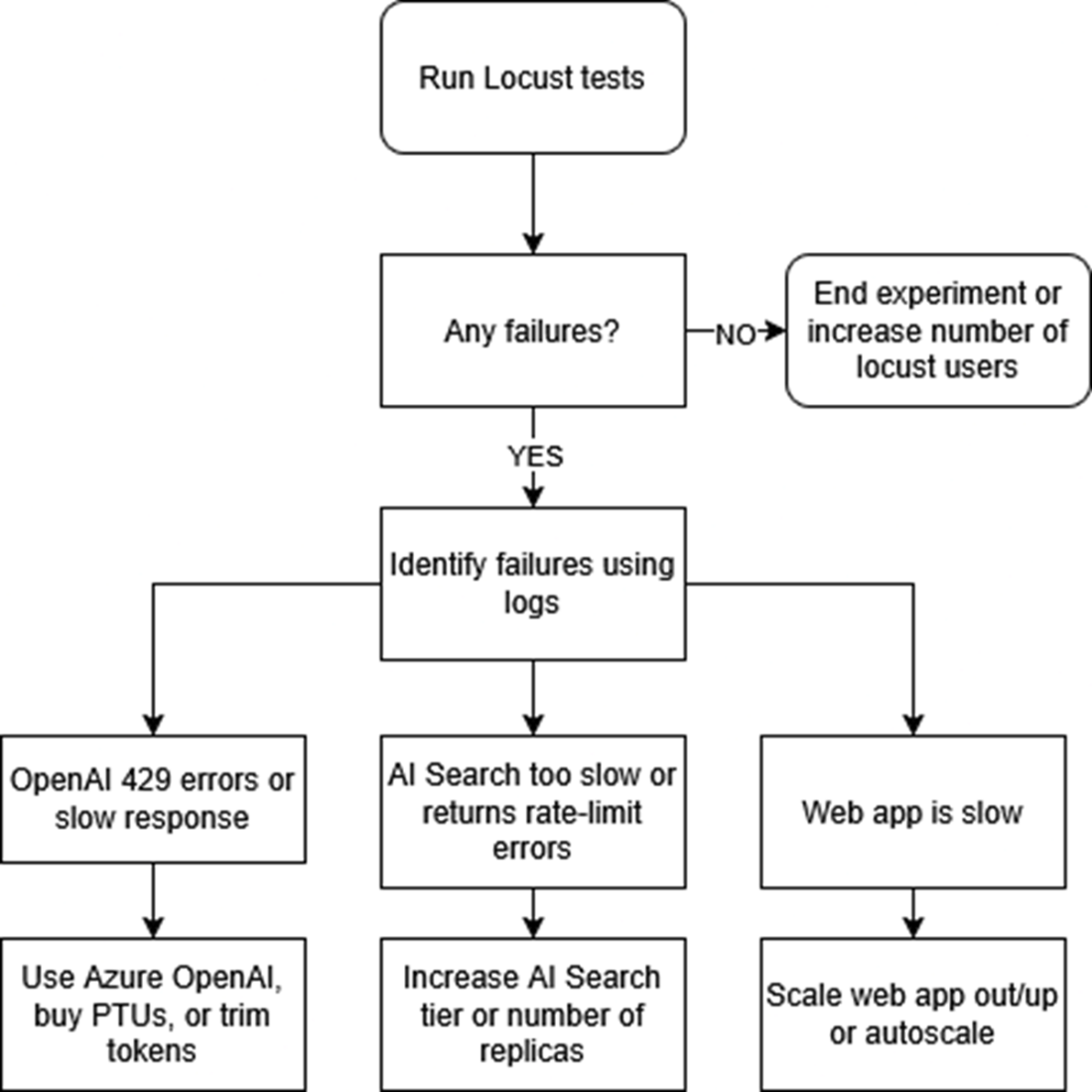
If we experience any failures during out Locust tests, we first look at our logs in our web app. Next, once we have identified the error, we fix it by scaling out that particular part of our system. For example, if we are getting rate limits from OpenAI, we increase the amount of requests we can send.
Summary
- Rolling out a RAG app is easier when you pair an Azure Web App with GitHub Actions, because every code push magically turns into a live app.
- By moving chat logs into Cosmos DB and pinning every package in requirements.txt, we turned our scripts into cloud-worthy code that can reboot safely and retain chat logs.
- Setting up a CI/CD pipeline means tests run automatically on each commit, so broken code gets caught in the pipeline instead of embarrassing you in front of real users.
- Adding friendly logging.info() calls throughout the code gives us play-by-play insight, so when something misbehaves under load we can trace the exact moment and function where it stumbles.
- Locust lets us unleash a pretend stampede of users, revealing performance potholes in a safe sandbox, so we can prepare for the real users.
- When bottlenecks appear, we learned to crank up AI Search tiers, boost our OpenAI token quotas, or spin up extra Web App instances—scaling only what’s necessary to keep response times snappy without lighting our budget on fire.

 Enterprise RAG ebook for free
