1 Meeting Postgres
This chapter introduces PostgreSQL as both a rock-solid relational database for OLTP workloads and a versatile general-purpose platform powered by a rich ecosystem of extensions. It explains how Postgres grew in popularity thanks to its community-driven open source model, conservative and reliable release cadence, and extensible design that enables capabilities like full-text search, time-series, geospatial, analytics, and vector similarity for AI. These strengths underpin the community mantra “just use Postgres,” which encourages developers to consider Postgres first for new use cases before adding another specialized database.
The phrase isn’t a blanket rule; it’s pragmatic advice. If Postgres (often with extensions) meets a need, you avoid the cost and complexity of running multiple databases; if it doesn’t, you should choose the best-fit tool. To get hands-on quickly, the chapter shows how to start Postgres in a Docker container using a persistent volume, check readiness via logs, and connect with the built-in psql client from inside the container. It highlights useful psql meta-commands for inspecting connections and schema so you can explore without installing extra tools on your host system.
With a running instance, the chapter demonstrates generating a mock “trades” dataset entirely in SQL using generate_series, random values, arrays, and timestamps, then inserting 1,000 rows for experimentation. It closes with essential queries: counting with filters, grouping and ordering to find most-traded symbols, and aggregating spend to identify top buyers—reinforcing why knowing SQL remains valuable even when using ORMs. By the end, you’ve seen Postgres’s breadth in practice and are set up to explore its capabilities in greater depth throughout the book.
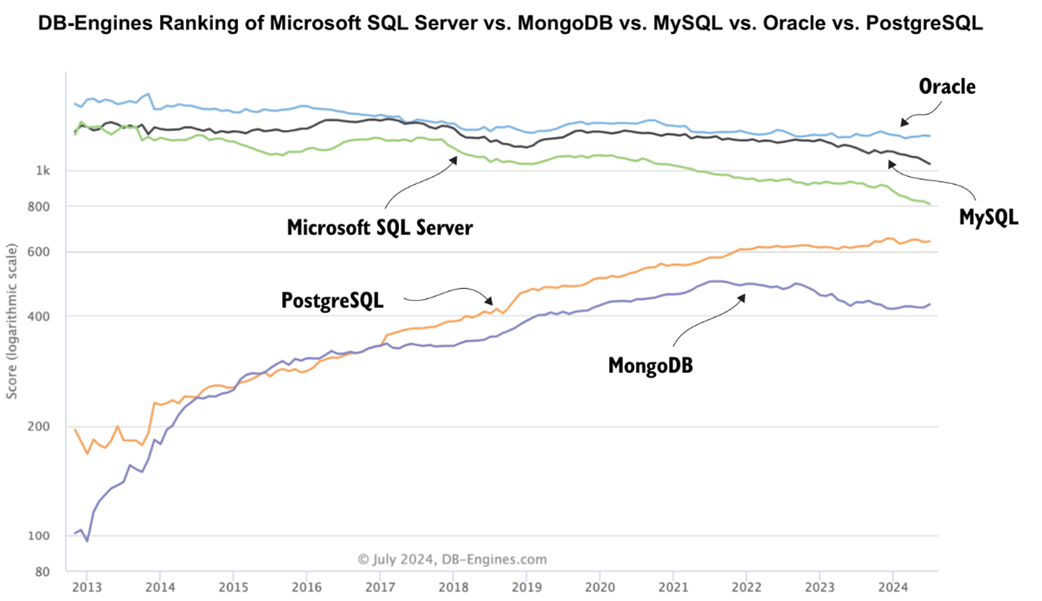
DB-Engines ranking showing Postgres trending up in popularity
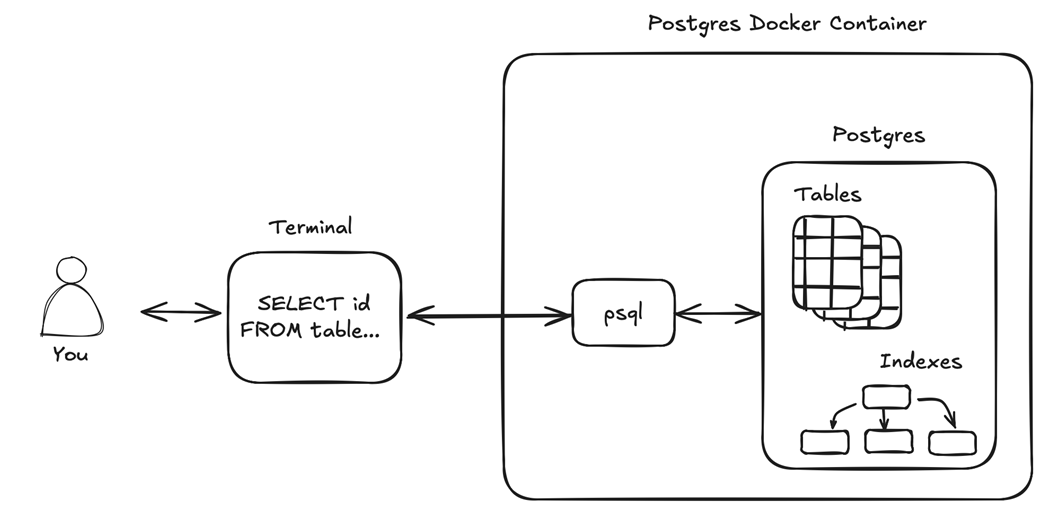
How Postgres is deployed and used throughout the book
Summary
- Postgres is one of the most popular and fastest-growing databases.
- Postgres’s open source nature, enterprise readiness, and extendibility are key factors contributing to its popularity and growth.
- The phrase “Just use Postgres” implies that Postgres offers a wide range of capabilities, allowing it to handle use cases far beyond traditional transactional workloads.
- Postgres is written in C and can be installed on Windows and a wide range of Unix-based operating systems.
- The database can be started as a container in under a minute on any operating system that supports Docker.
- Postgres comes with the generate_series function, which can be used to generate mock data of varying complexity.
- Postgres “speaks” SQL natively, allowing you to solve various business tasks by crafting simple and elegant SQL queries.
FAQ
What does “Just use Postgres!” actually mean?
It’s a practical guideline: if you already use (or plan to use) Postgres and a new use case appears (geospatial, time series, generative AI, analytics, etc.), first check whether Postgres can handle it before adding another database. It’s not a one-size-fits-all rule—if Postgres isn’t the best fit, use a different database.Why is Postgres so popular among developers?
Three main reasons: (1) Open source and community-governed (no single vendor control), (2) enterprise-ready and stable with incremental annual releases, and (3) extendible by design with a rich ecosystem of extensions. Surveys (e.g., Stack Overflow 2023/2024) and DB-Engines rankings reflect this momentum.What kinds of workloads can Postgres handle beyond OLTP?
Postgres has evolved into a general-purpose database. With extensions and built-in features it supports full-text search, time-series, geospatial, analytics, and vector similarity/generative AI workloads—often without leaving Postgres.How do I start Postgres quickly using Docker?
Unix/macOS/Linux:
docker volume create postgres-volume
docker run --name postgres \
  -e POSTGRES_USER=postgres -e POSTGRES_PASSWORD=password \
  -p 5432:5432 \
  -v postgres-volume:/var/lib/postgresql/data \
  -d postgres:17.2
Windows PowerShell uses backticks for line breaks. Key flags: POSTGRES_USER/PASSWORD set credentials, -p exposes 5432, -v persists data, -d runs detached, and postgres:17.2 pins the version used in the book.
How do I verify the container is running and ready?
List the container:
docker container ls -f name=postgres
Check logs for readiness:
docker logs postgres
Look for “database system is ready to accept connections.”
How do I connect with psql from the Docker container?
Run:
docker exec -it postgres psql -U postgres
This connects via a local Unix socket inside the container, which the image treats as trusted—no password prompt. Use \q to quit.
What useful psql meta-commands should I know right away?
- \? shows all meta-commands (press q to exit the pager)- \conninfo shows current connection details
- \d lists tables/views/sequences in the current database
- \q exits psql
How can I generate mock data inside Postgres without external tools?
Create a table, then use generate_series, random, and arrays:
CREATE TABLE trades(
  id bigint, buyer_id integer, symbol text,
  order_quantity integer, bid_price numeric(5,2),
  order_time timestamp
);

INSERT INTO trades (id, buyer_id, symbol, order_quantity, bid_price, order_time)
SELECT
  id,
  random(1,10),
  (array['AAPL','F','DASH'])[random(1,3)],
  random(1,20),
  round(random(10.00,20.00), 2),
  now()
FROM generate_series(1,1000) AS id;
Note: random(min,max) requires Postgres 17; earlier versions need a different expression.
Is using count(*) a bad practice, and how does Postgres treat it?
In general, avoid SELECT * when you don’t need all columns. However, count(*) is a special case in Postgres: it simply counts rows and doesn’t fetch column data, so using count(*) is fine and efficient for row counts.What are examples of basic queries I can run on the sample trades?
Most-traded stocks by volume:
SELECT symbol, count(*) AS total_volume
FROM trades
GROUP BY symbol
ORDER BY total_volume DESC;
Top 3 buyers by total spend:
SELECT buyer_id, sum(bid_price * order_quantity) AS total_value
FROM trades
GROUP BY buyer_id
ORDER BY total_value DESC
LIMIT 3;

 Just Use Postgres! ebook for free
