6 AI & Data Quality
Data quality in traditional data engineering has been a fragmented, rules-heavy endeavor—spanning SQL, pandas, regexes, and vendor tools—where every new edge case demands bespoke logic and maintenance. This chapter introduces an AI-centered alternative: expressing data quality expectations in natural language and letting a single model reason across missing values, invalid formats, anomalies, duplicates, and reference mapping within existing pipelines. While AI can be slower and incurs cost, it unlocks flexibility, enables domain experts to contribute without coding, and expands coverage beyond what hard-coded checks anticipate.
The chapter contrasts Python/pandas approaches for identifying problems (nulls, negatives, malformed emails) with an OpenAI Chat Completions workflow that detects inconsistencies via prompts. It then evolves toward reliable automation using structured outputs: response_format and Pydantic data classes define contracts the model must satisfy, turning free-form text into deterministic, parseable objects. By separating system instructions from user data in multi-message prompts, the chapter shows how to remove duplicates, drop null-heavy columns, and standardize datasets with predictable outputs that are easier to debug and integrate into production data pipelines.
Beyond detection, the chapter tackles structural and formatting fixes common in real pipelines—standardizing dates, validating SKUs, truncating descriptions, concatenating names, and mapping products to categories—first with explicit pandas logic, then with a single AI call that returns aligned, row-ordered lists for every transformation. A hands-on lab reinforces the pattern across a richer dataset, emphasizing clear prompts, schema-enforced responses, and a practical row-by-row calling strategy to avoid uneven results. The overarching takeaway is a reusable, scalable framework: keep Python for speed and control where rules are clear, but let AI provide broad, adaptable coverage and structured outputs where requirements are ambiguous or evolving.
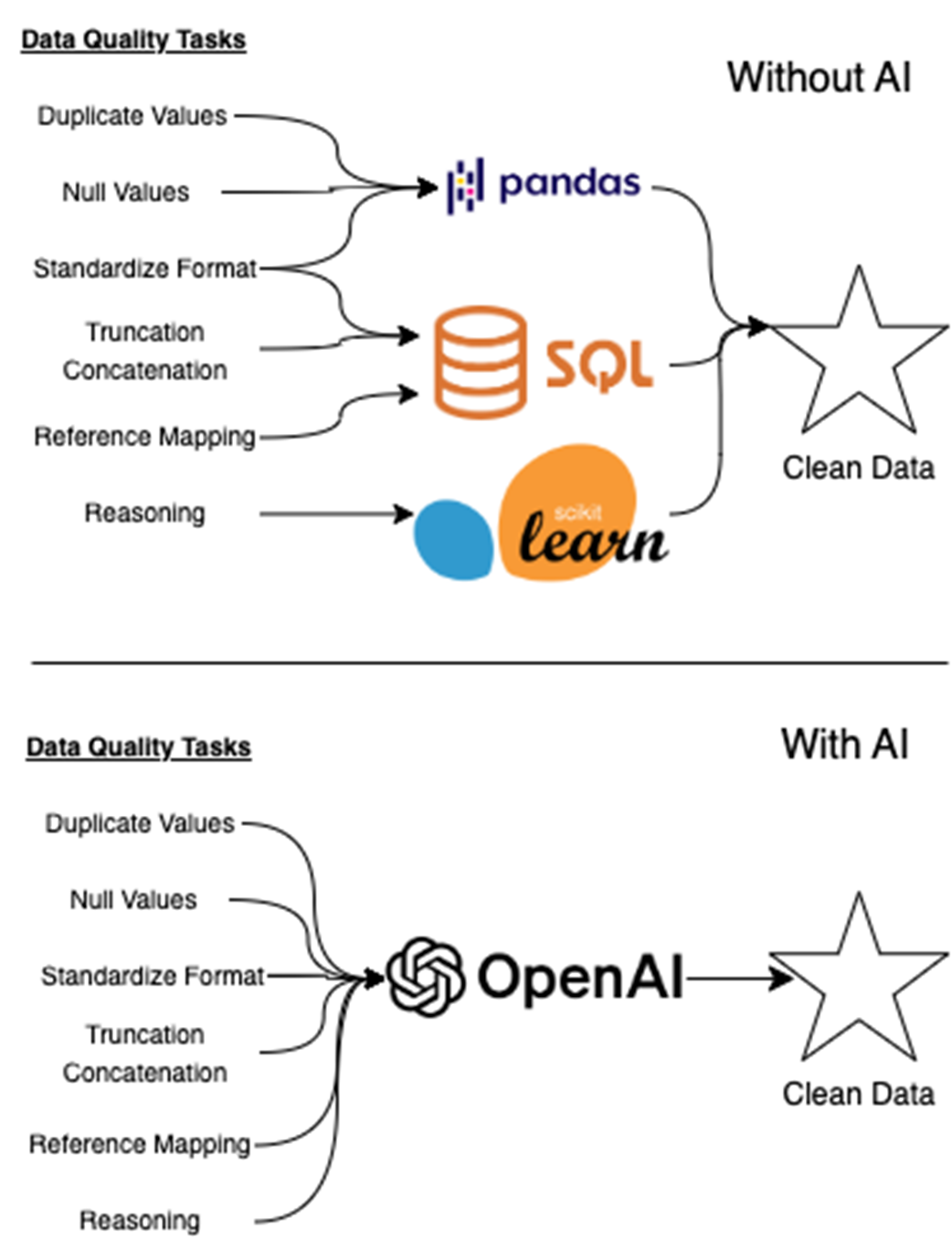
Traditional data quality pipelines often require multiple tools—like SQL, pandas, and scikit-learn—to handle tasks such as null detection, format enforcement, and rule-based validation. As shown in figure 6.1, each tool typically addresses a narrow part of the workflow. With AI, however, many of these tasks can be consolidated into a single interface. A well-prompted model can reason across diverse data quality issues, from detecting duplicates to mapping references, enabling a unified, intelligent path to clean data.
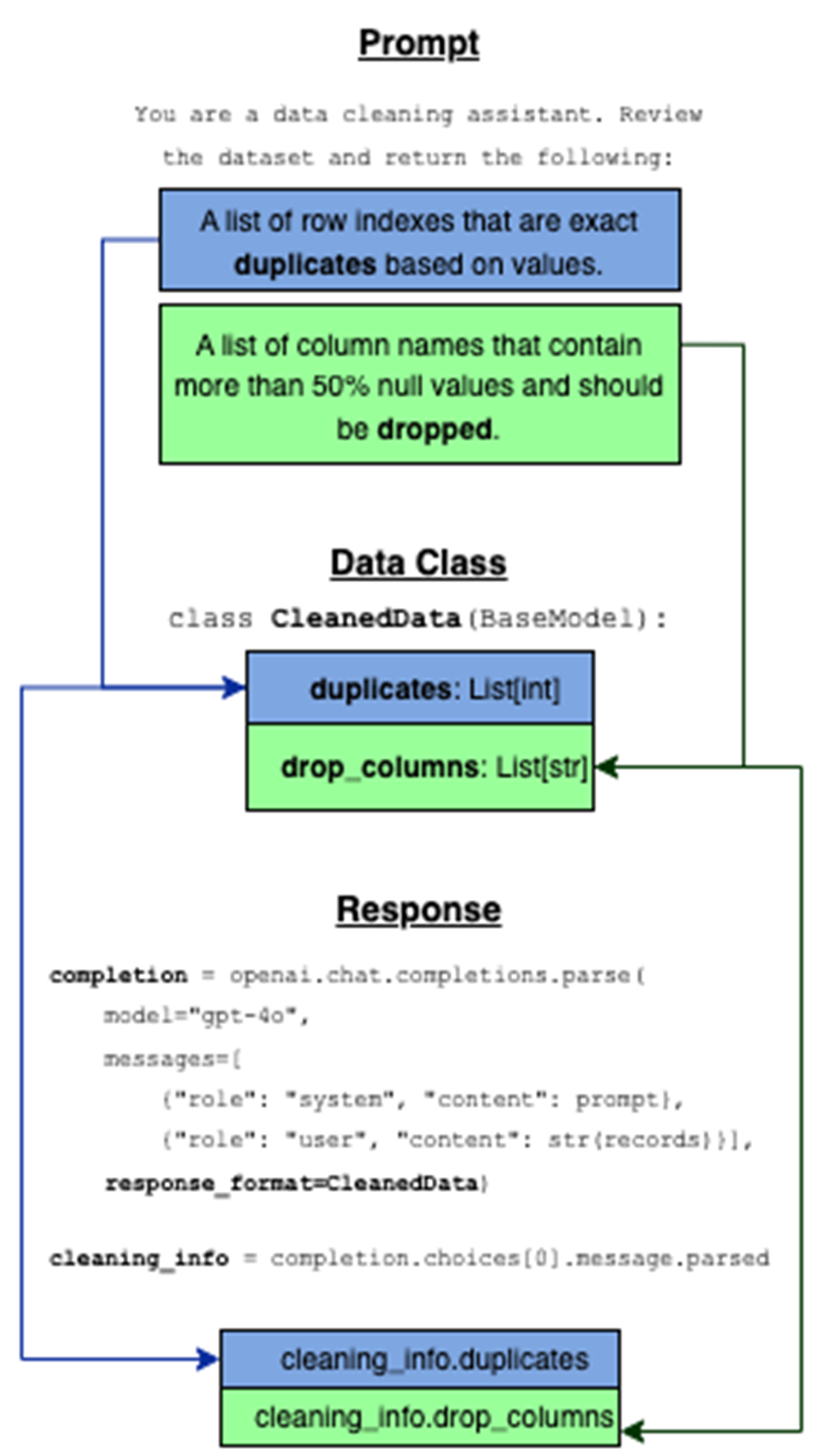
The data class acts as a contract between the prompt and the model’s response. The prompt defines what kind of output we want, the data class formalizes that structure, and response_format ensures the model returns data in a predictable, usable format. This makes it easy to extract structured results directly from the model without extra parsing.

Dataframe before transformations (top) and the dataframe after transformations (bottom). This is the output of the implementation of listing 6.5 and shows the type of cleaning we need to do in order to make our data legible and useful to downstream consumers.

Cleaned dataset after applying AI-generated standardization rules. The AI model returned structured outputs for date normalization, SKU validation, description truncation, name concatenation, and category mapping. Each transformation was handled in a single API call using a custom response schema, producing a clean, ready-to-use dataset with minimal parsing logic in the code.

Lab Answers
Refer to the Chapter 6 Lab Jupyter Notebook for full answers.
- You should follow the same pattern we used in Listing 6.5. To clean date formats, a custom function like this is used:
SKU format is enforced withregex:
To validate emails, use this regex and filter the DataFrame:
Create the full_name column using:
Description-based category mapping is done with a dictionary:
These techniques match the patterns introduced earlier in the chapter using pandas, map(), apply(), and filtering logic.
- This step uses the same techniques introduced earlier in the chapter—structured prompting, a BaseModel schema, and the response_format parameter. But once we move from toy data to real-world messiness, we hit a problem: the model doesn’t always return one row for every input.
In earlier listings (like 6.4 and 6.6), we passed the full dataset in a single API call:
This works fine if the model returns a perfectly aligned list for each field. But if even one row is skipped, you’ll get dreaded ValueErrors.
Instead of processing the whole DataFrame at once, we clean each record individually and rebuild a new dataset:
This avoids the entire row-alignment issue by guaranteeing each response matches exactly one input. Plus, using tqdm adds helpful feedback during processing.
The logic and structure of the API call hasn’t changed—but applying it one row at a time makes the system far more reliable, especially when cleaning dirty data in production environments.

 Learn AI Data Engineering in a Month of Lunches ebook for free
