Modern data professionals are expected to manage a wide spectrum of responsibilities across numerous technologies and at scales that range from a handful of servers to thousands. Relying on graphical tools alone makes routine work slow and inconsistent, whereas automation offers speed, accuracy, and repeatability. PowerShell emerges as the unifying tool that connects these technologies and enables reliable, scalable operations—turning repetitive, error-prone tasks into dependable, scripted processes that save time and reduce risk.
The chapter champions an “automate it” mindset: invest effort early to script tasks so they run consistently and without human error. PowerShell’s cross-platform reach and scheduling capabilities make it ideal for such work, and dbatools builds on that foundation with a community-driven toolkit tailored to SQL Server administration. With hundreds of contributors, dbatools encapsulates hard-won best practices and everyday solutions—from backups and restores to migrations and Availability Groups—while integrating with well-known community utilities and receiving support from the broader SQL ecosystem.
The book is aimed at SQL Server DBAs and data platform practitioners who want to get things done with PowerShell, even if they’re not developers. It emphasizes accomplishing real administrative tasks at scale using ready-made commands, assumes basic SQL Server familiarity, and follows a practical “one chapter a day” rhythm with hands-on labs. Readers progress from environment discovery to complex operations like migrations, gain confidence to adapt scripts to their own estates, and are encouraged to explore related technologies and engage with the active community for guidance and growth.
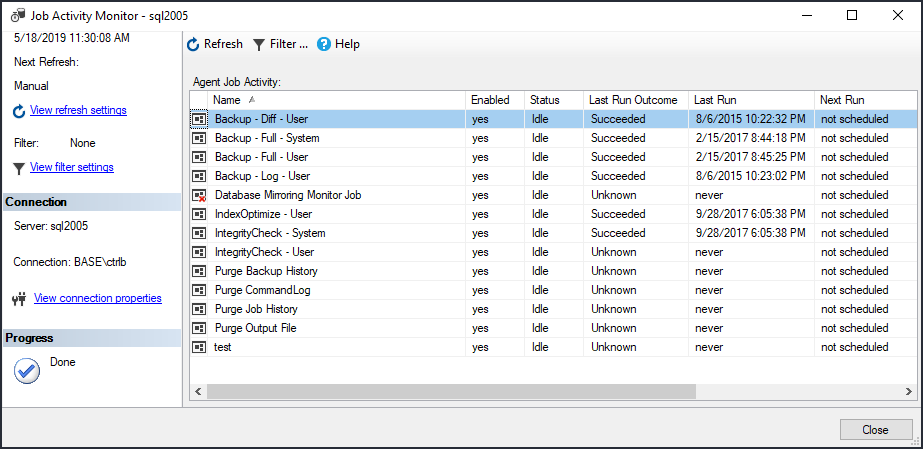
Figure 1.1. Job Activity Monitor
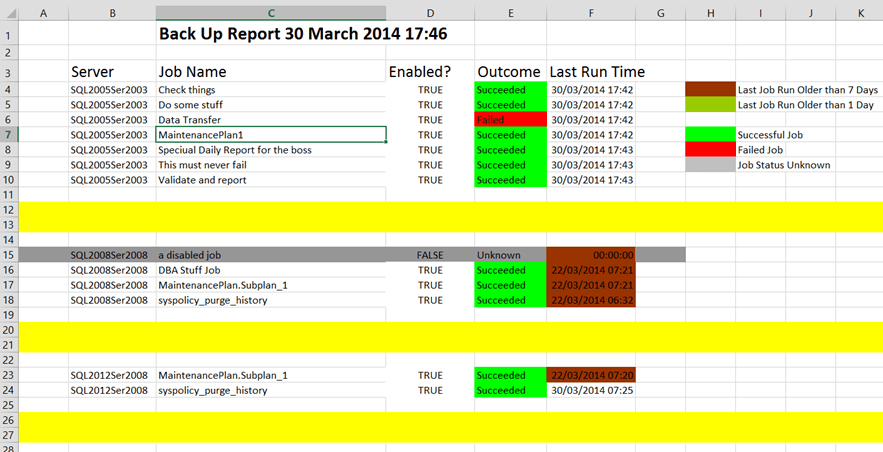
Figure 1.2. Color coded Excel output from PowerShell
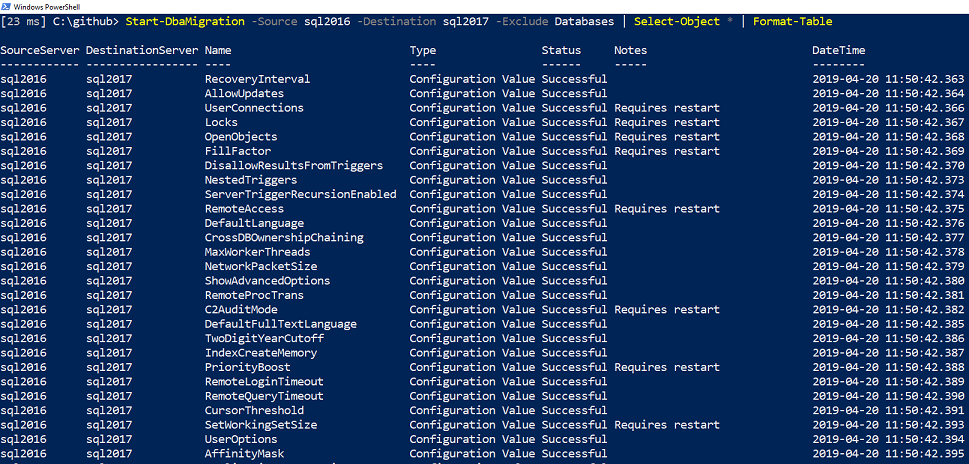
The great thing about dbatools is that most of the development work has been done for you. A bunch of community members collectively invested thousands of hours to build a standardized toolset that help us manage our daily tasks. This also means you can manage these same tasks by just executing a few commands.
Like the authors of PowerShell in a Month of Lunches, Don Jones and Jeff Hicks, our primary goal in this book is for you to be "immediately effective". This means that a section may be initially light on the details so that you can jump right in and accomplish some tasks. If necessary, we will provide additional depth, theory and nuances later in the chapter, in online articles or highlight it in a livestream.
FAQ
Why can’t data professionals ignore PowerShell anymore?Because data teams manage many technologies and often multiple SQL instances, GUIs become slow and inconsistent. PowerShell enables fast, repeatable automation across environments, reducing human error and saving time.Which common DBA tasks benefit from PowerShell automation?Tasks such as building SQL Server hosts, ETL workflows, configuring instances, monitoring and alerting, performance and access troubleshooting, OS/SQL upgrades, schema deployments, and index reviews are all prime candidates.What was the “first win” example of using PowerShell in the chapter?A DBA automated daily SQL Agent job checks across 100+ instances, replacing a 90-minute manual routine with a quick review of a color-coded Excel output, reducing errors and effort.When should I automate a task?Automate anything you do more than once—ideally the first time—because scripting drives thoroughness, consistency, and reusability, and it can be scheduled to run unattended.Why use a script instead of step-by-step screenshots?Scripts are repeatable, consistent, and easier to maintain. Well-commented code reduces assumptions and avoids the maintenance burden and ambiguity of large, screenshot-heavy documents.What is dbatools?dbatools is an open-source, cross-platform PowerShell toolkit for SQL Server created by the community. It streamlines tasks like backups, restores, migrations, and Availability Groups, enabling reliable, scalable automation.How does dbatools relate to Microsoft and community tools?It complements Microsoft’s SqlServer module and has support from the SQL Tools Team. dbatools integrates with popular community solutions (e.g., Ola Hallengren’s maintenance, Glenn Berry’s queries, sp_WhoIsActive, FRK, sqlwatch).Is this book right for me if I’m not a PowerShell developer?Yes. It’s aimed at data platform practitioners. You’ll learn to accomplish SQL Server administration tasks using PowerShell, not to become a PowerShell developer. Basic SQL admin knowledge is expected.How should I use the book to learn effectively?Read one chapter per day (about 40 minutes) and spend extra time practicing. Follow the chapters in order (1–24). Use the hands-on labs and, if needed, get help at https://dbatools.io/molforum and find lab answers at https://dbatools.io/answers.Where can I get help and connect with the authors/community?Join the SQL Community Slack #dbatools channel at https://dbatools.io/slack. Follow the authors on Twitter (e.g., @cl, @sqldbawithbeard, @jpomfret, @ClaudioESSilva) and @psdbatools. You can also catch live coding at https://dbatools.io/live.
pro $24.99 per month
access to all Manning books, MEAPs, liveVideos, liveProjects, and audiobooks!

 Learn dbatools in a Month of Lunches ebook for free
