1 Web dev math fundamentals
Math is woven into everyday frontend work, even when it is not obvious. Relative units, easing curves, element measurements, responsive sizing, and animation behavior all rely on mathematical ideas that help websites behave predictably. The chapter argues that understanding these basics improves precision, reliability, and creative control, without requiring advanced formal math.
The text also emphasizes that math is already central to both design and development decisions. It shows how CSS uses math declaratively for sizing, positioning, scaling, and transitions, while JavaScript uses math procedurally for dynamic calculations, interaction handling, and real-time updates. The two languages complement each other, and choosing the right one depends on whether the task is best handled by the browser at render time or by code reacting to changing conditions.
To prepare readers for later chapters, the chapter introduces the minimum math needed for frontend work: arithmetic, algebra, ratios, exponents and roots, linear equations, inequalities, geometry, trigonometry, and coordinate systems. Each concept is tied to practical examples such as responsive layouts, scroll progress, aspect ratios, circular menus, canvas drawing, and viewport-based positioning. The overall message is that a small amount of mathematical understanding can greatly improve the quality, flexibility, and elegance of web interfaces.
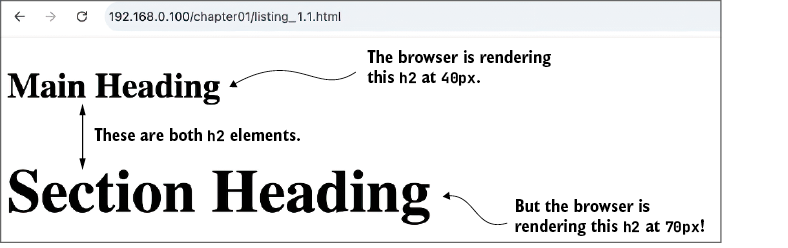
Why is the section heading so much bigger than the main heading? Math!
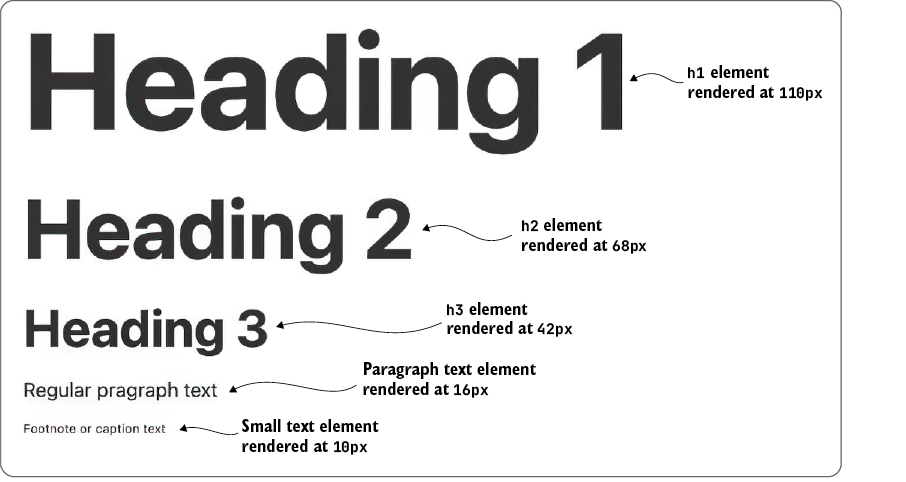
A type scale based on the golden ratio (approximately 1.618).
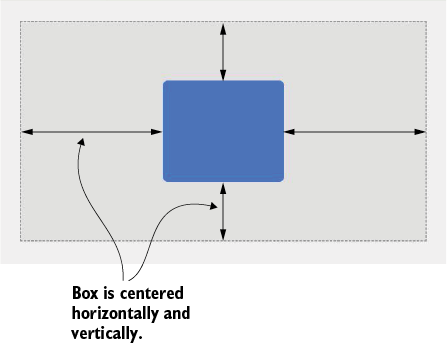
Centering an element within its containing block requires just a few CSS declarations, but behind the scenes, the browser is jumping through many mathematical hoops to get the job done.
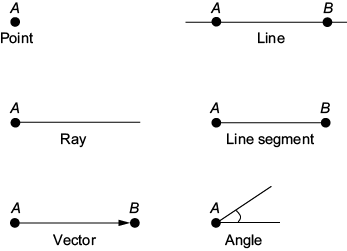
Some basic geometric figures
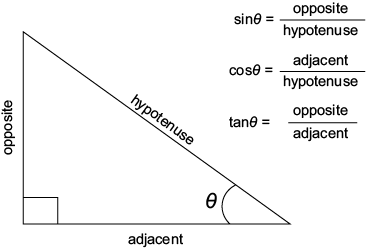
A right triangle and its sides relative to the angle theta (θ)
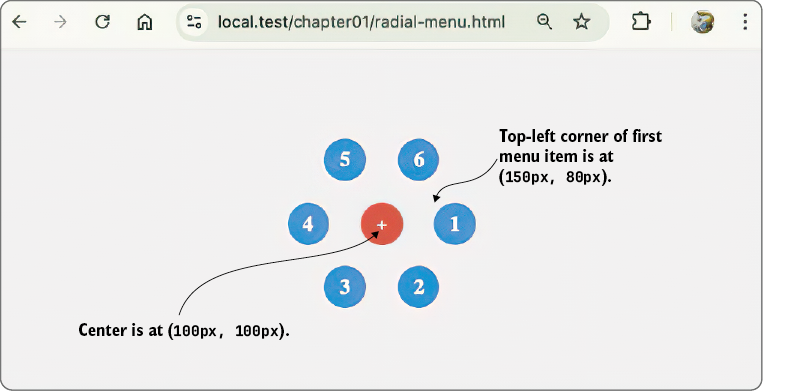
Using trigonometry to arrange menu items in a circle
Summary
- Learning about frontend math will help you build more precise and reliable layouts, write more performant code, and debug layout problems faster.
- Mathematics in UI and UX design has practical use cases for responsive layouts, typography, color, spacing, and alignment.
- Developers use math when coding motion and animation, layouts, and user interactions.
- In CSS, you use math to position and transform elements, scale layouts, build responsive elements, style text, and animate transitions.
- CSS provides math functions that can be used to perform basic arithmetic right in your style declarations.
- JavaScript gives you full control with dynamic, real-time math using the
Mathobject and custom logic. - Use CSS math for layout, sizing, spacing, simple animation, and typography when the values can be determined by the browser at render time.
- Use JavaScript math when you need interaction, advanced animation, or real-time adjustments based on user behavior or complex conditions.
FAQ
Why is math important in frontend web development?
Math helps you build more precise layouts, smoother animations, more responsive designs, and easier-to-debug interfaces. It also improves your ability to create creative effects and write smarter code.Do I need to be very good at math to be a frontend developer?
No. You don’t need advanced math or a graduate-level background. The chapter emphasizes that a small set of practical math concepts is enough to make a big difference in web design and development.Where does math appear in everyday CSS work?
Math shows up in CSS through relative units likeem, rem, percentages, viewport units, and functions like calc(), min(), max(), and clamp().Where does math appear in everyday JavaScript work?
JavaScript uses math for rounding, random values, minimum/maximum checks, distance calculations, movement, animation, angles, and dynamic layout logic using theMath object and arithmetic operators.Why can two headings with the same font-size: 2em look different?
Because em values are relative to the element’s context. In the chapter’s example, inheritance causes the computed size to differ depending on the parent element, so the section heading ends up larger than the main heading.
 Math for Web Design ebook for free
