This chapter introduces a disciplined way to build Python command-line programs by starting with a simple Hello, World! script and gradually improving it into a documented, tested, reusable program. It emphasizes creating files in the correct project directory, running programs from the terminal, adding comments and docstrings for documentation, and using pytest to verify that the program behaves as expected. The chapter also shows how test output helps guide development by identifying what works, what fails, and what should be fixed next.
The program is improved step by step so it can run like a normal command-line tool. A shebang line tells the operating system to use python3, chmod +x makes the file executable, and the $PATH environment variable explains how the system finds programs. The chapter then introduces argparse to handle command-line arguments, automatically generate help messages, and support both required positional arguments and optional named arguments with defaults. The greeting program evolves from always printing Hello, World! to accepting a name while still defaulting to World when no name is supplied.
The chapter also teaches how to organize Python programs according to common community practices. Code is placed inside a main() function, argument parsing is separated into a get_args() function, and tools such as flake8, pylint, yapf, and black are used to find style issues, missing documentation, and formatting problems. Finally, the chapter recommends using make test as a shortcut for repeated testing and introduces new.py or a template file as a practical way to start future programs from a complete, executable, documented structure instead of beginning from scratch.
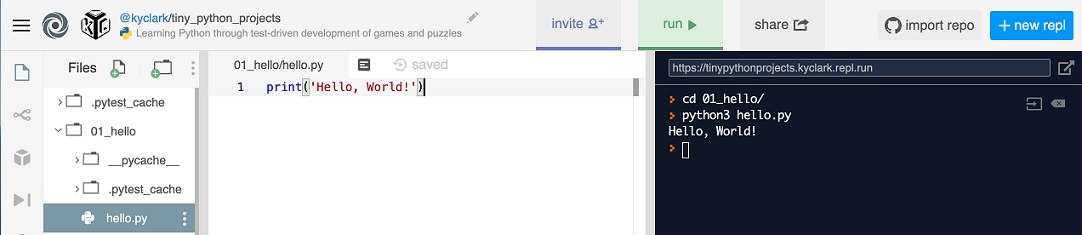
Figure 1.1. Writing and running our first program using repl.it.
Summary
- A Python program is plain text that lives in a file. We need the
python3program to interpret and execute the program file.
- You can make a program executable and copy it to a location in your
$PATHso that you can run it like any other program on your computer. Be sure to set the shebang to use theenvprogram to find the correctpython3.
- The
argparsemodule will help you document and parse all the parameters to your program. You can validate the types and numbers of arguments which can be positional, optional, or flags. The usage will be automatically generated.
- We will use the
pytestprogram to run thetest.pyprograms for each exercise. Themake testshortcut will executepytest -xv test.pyor you can run this command directly.
- You should run your tests often to ensure that everything works.
- Code formatters like
yapfandblackwill automatically format your code to community standards, making it easier to read and debug.
- Code linters like
pylintandflake8can help you correct both programmatic and stylistic problems.
- You can use the
new.pyprogram to generate new Python programs that useargparse.
FAQ
What is the first Python program created in this chapter?
The chapter begins with a simple hello.py program that prints:
print('Hello, World!')You run it from the terminal with:
python3 hello.pyThe expected output is:
Hello, World!Why must hello.py be created inside the 01_hello directory?
The hello.py file needs to be inside the 01_hello directory because the provided test.py program looks for it there. If the file is created somewhere else, the tests will not be able to find it.
What does the # character mean in Python?
In Python, the # character starts a comment. Python ignores the # and everything after it on that line.
Comments are useful for documenting code or temporarily disabling code while testing or debugging.
# Purpose: Say hello
print('Hello, World!')
The comment line is ignored, so the program still prints Hello, World!.
How are tests run for the hello.py program?
The chapter uses pytest to run tests from the provided test.py file:
pytest -v test.pyThe -v option means “verbose,” which shows more detailed test output.
The author recommends using:
pytest -xv test.pyHere, -x stops testing after the first failure, and -v gives verbose output.
What is a shebang line, and why is it added to Python programs?
A shebang line is a special first line in a script that starts with #!. It tells the operating system what program should be used to run the file.
For Python 3 programs, the chapter recommends:
#!/usr/bin/env python3Python treats this line like a comment, but the operating system uses it to find and run python3.
Why use #!/usr/bin/env python3 instead of a direct path to Python?
Python may be installed in different locations on different computers. For example, one computer might have Python at one path, while another system may have it somewhere else.
Using:
#!/usr/bin/env python3allows the env program to find the correct python3 available in the current environment. This makes the program more portable across different machines.
How do you make hello.py executable?
After adding the shebang line, you can make the program executable with the chmod command:
chmod +x hello.pyThe +x adds executable permission to the file.
Then you can run it directly from the current directory:
./hello.pyWhat is $PATH, and why is it important?
$PATH is an environment variable containing a list of directories where the operating system looks for executable programs.
The directories are usually separated by colons, such as:
/usr/local/bin:/usr/bin:/binIf a program such as hello.py is copied into a directory listed in $PATH, it can be run from anywhere without typing ./ or being in the same directory.
How does argparse help with command-line arguments?
The argparse module parses command-line arguments and automatically creates helpful usage messages.
For example, a required positional argument can be added like this:
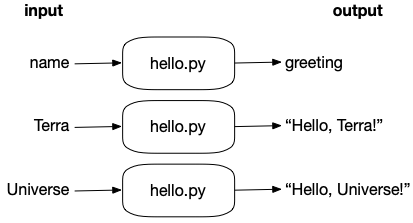
parser.add_argument('name', help='Name to greet')This allows the program to greet a name supplied by the user:
./hello.py TerraOutput:
Hello, Terra!argparse also automatically supports help flags such as -h and --help.
What is the difference between positional and optional arguments?
A positional argument does not start with a dash and is usually required. For example:
nameAn optional argument starts with one or two dashes and can usually be left out. For example:
-n
--name
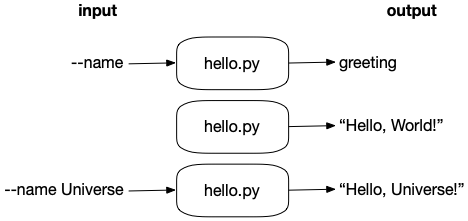
Optional arguments can have default values. In the chapter, the program is changed so that name defaults to World:
parser.add_argument('-n', '--name', default='World', help='Name to greet')So running:
./hello.pyprints:
Hello, World!
 Tiny Python Projects ebook for free
