11 Analyzing potential JVM issues with GC logs
Garbage Collection logs are presented as a practical, high‑signal window into how the JVM manages memory, transforming cryptic output into actionable diagnostics. The chapter shows how GC logs help uncover root causes behind slowdowns, spikes in CPU, stop‑the‑world pauses, and instability—illustrated by incidents where mis‑tuned heaps or unchecked thread growth led to aggressive Full GCs and service degradation. Beyond demystifying terminology and event types (young, mixed, full), it emphasizes a methodical approach to reading the logs and, when scale or volume makes manual review impractical, leveraging AI assistance to rapidly surface patterns and anomalies.
Practically, the chapter walks through enabling logging with -Xlog:gc* and redirecting output to files with time, uptime, level, and tags for reliable, structured analysis. It explains what initialization lines reveal (collector, JVM version, CPUs, heap and region sizes, worker counts) and how event logs expose phases and timings, tying them back to heap organization (Eden, Survivor, Old). For real‑world operations, it recommends storing logs separately, timestamping filenames, and configuring rotation (filecount, filesize) to prevent overwrites and bloat. It also offers guidance on choosing logging levels: errors/warnings in production to reduce overhead, info for routine visibility, and debug/trace only in controlled environments or focused investigations—optionally assisted by specialized tooling or AI to accelerate triage.
For analysis, the chapter centers on correlating pause durations, frequency, and before/after heap usage to diagnose performance lags, then distinguishing memory leaks (little reclaimed even after Full GC, monotonic growth) from insufficient memory (frequent but effective collections with sawtooth patterns). Remediation spans tuning heap sizing (Xms/Xmx), adjusting generation sizing and allocation behavior, selecting a suitable collector for latency goals (e.g., G1 vs low‑pause alternatives), and refining GC parallelism via -XX:ParallelGCThreads and -XX:ConcGCThreads to avoid both underutilization and CPU contention. The overarching message is iterative, evidence‑driven tuning: capture clean logs, read the right signals, validate hypotheses, and apply targeted changes while monitoring their real workload impact.
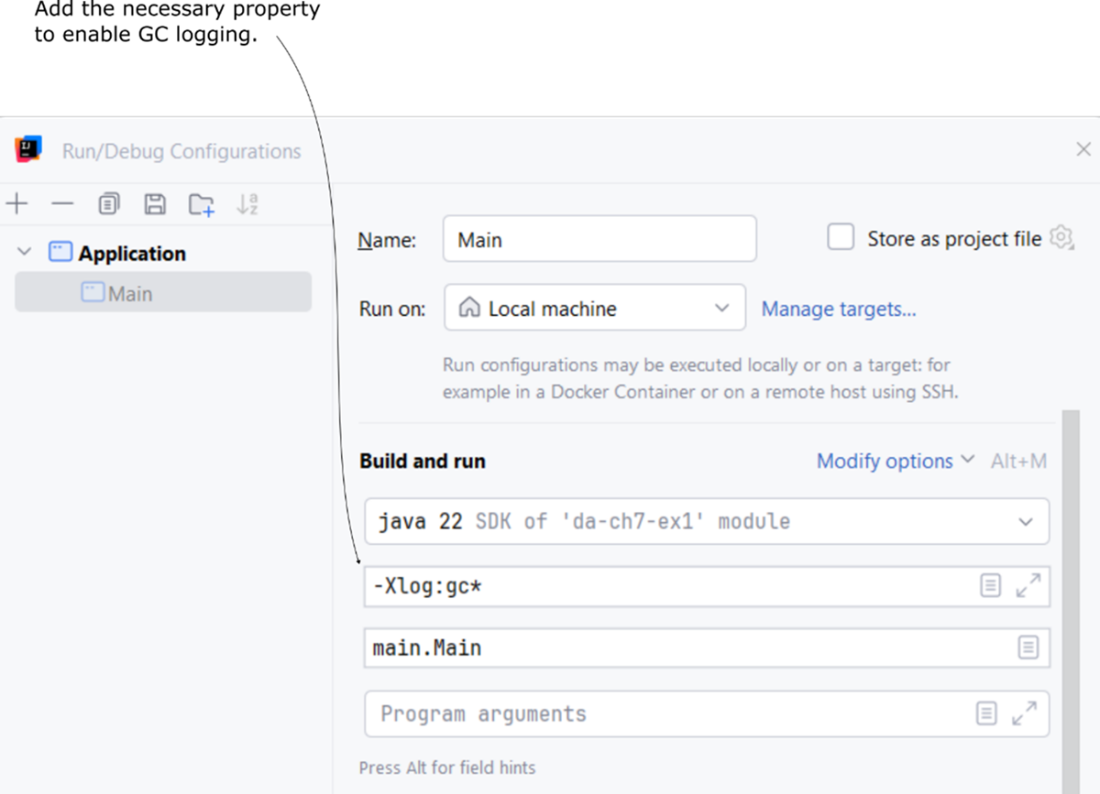
Enabling the GC logs in IntelliJ IDEA running configuration to display the GC logs in the execution console.
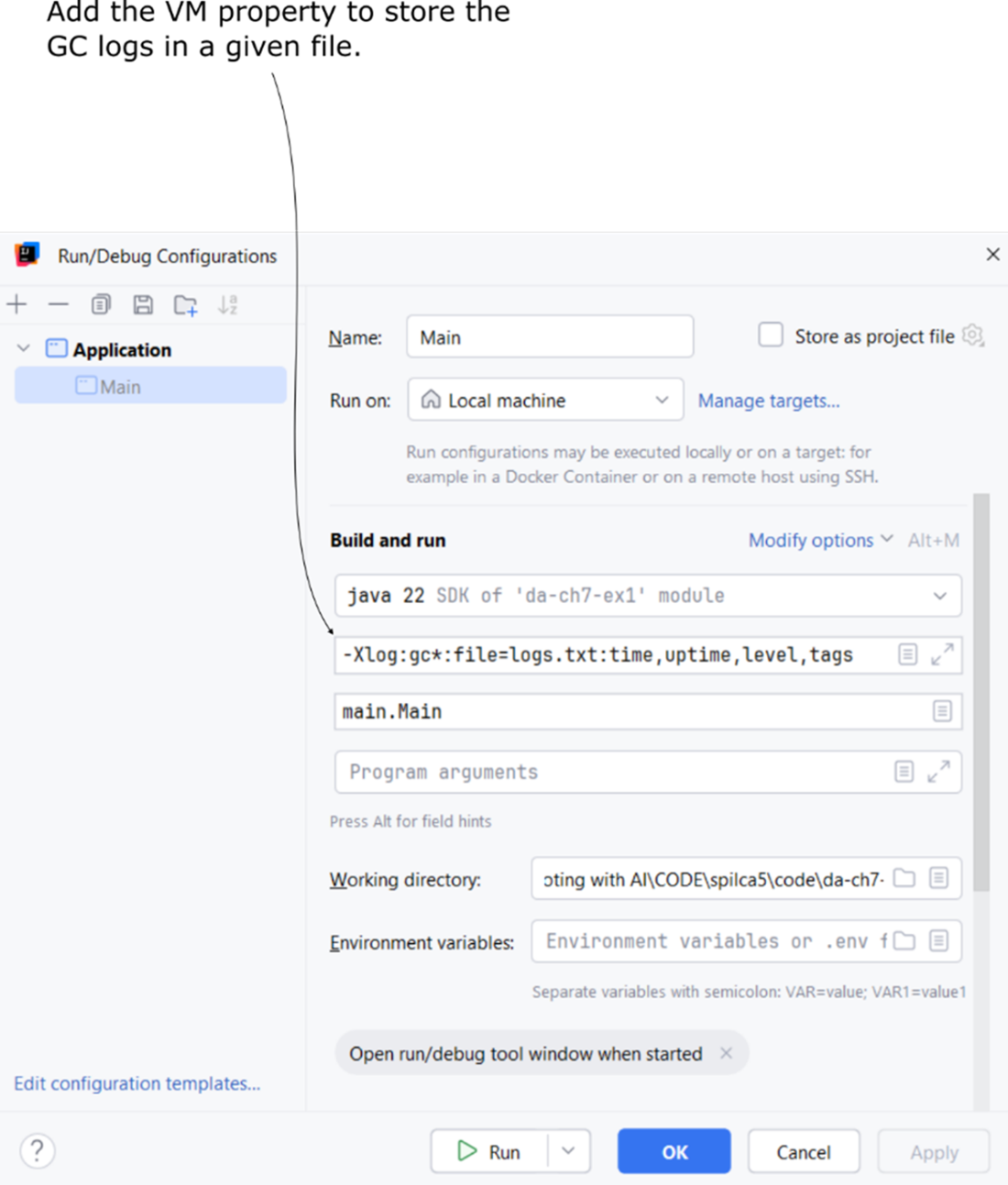
Adding a VM property to store GC logs for the application's execution in a specified file.
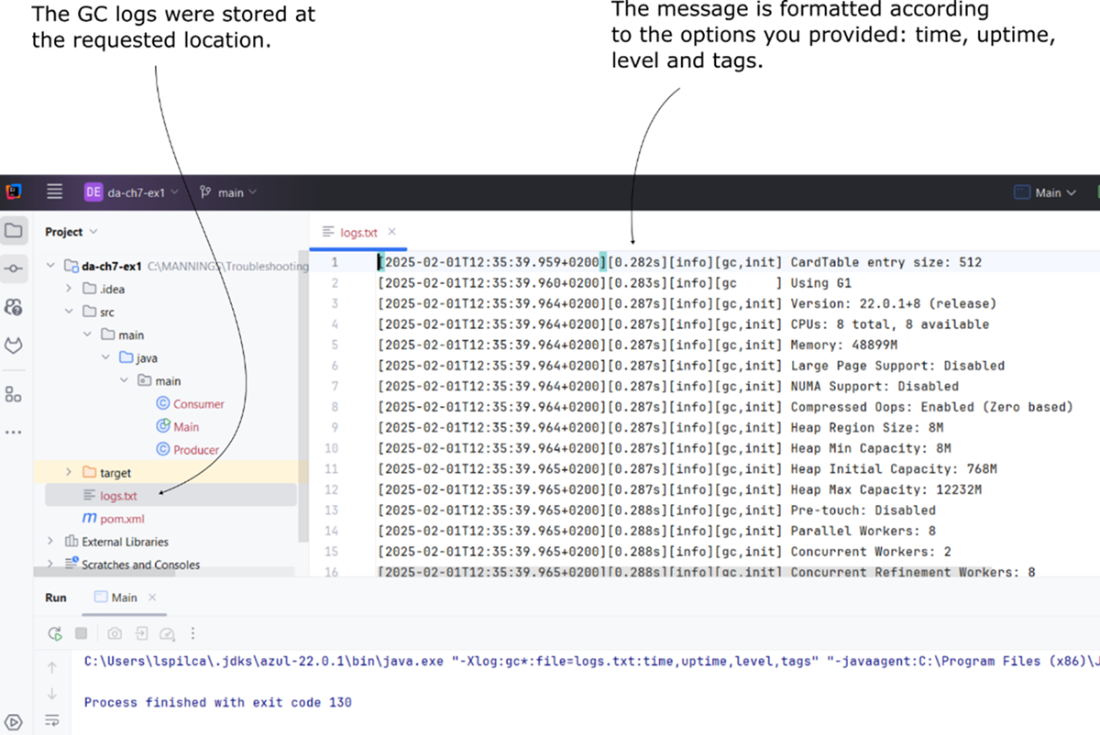
Properly formatted GC logs are stored in the specified file, as defined by the VM parameter.
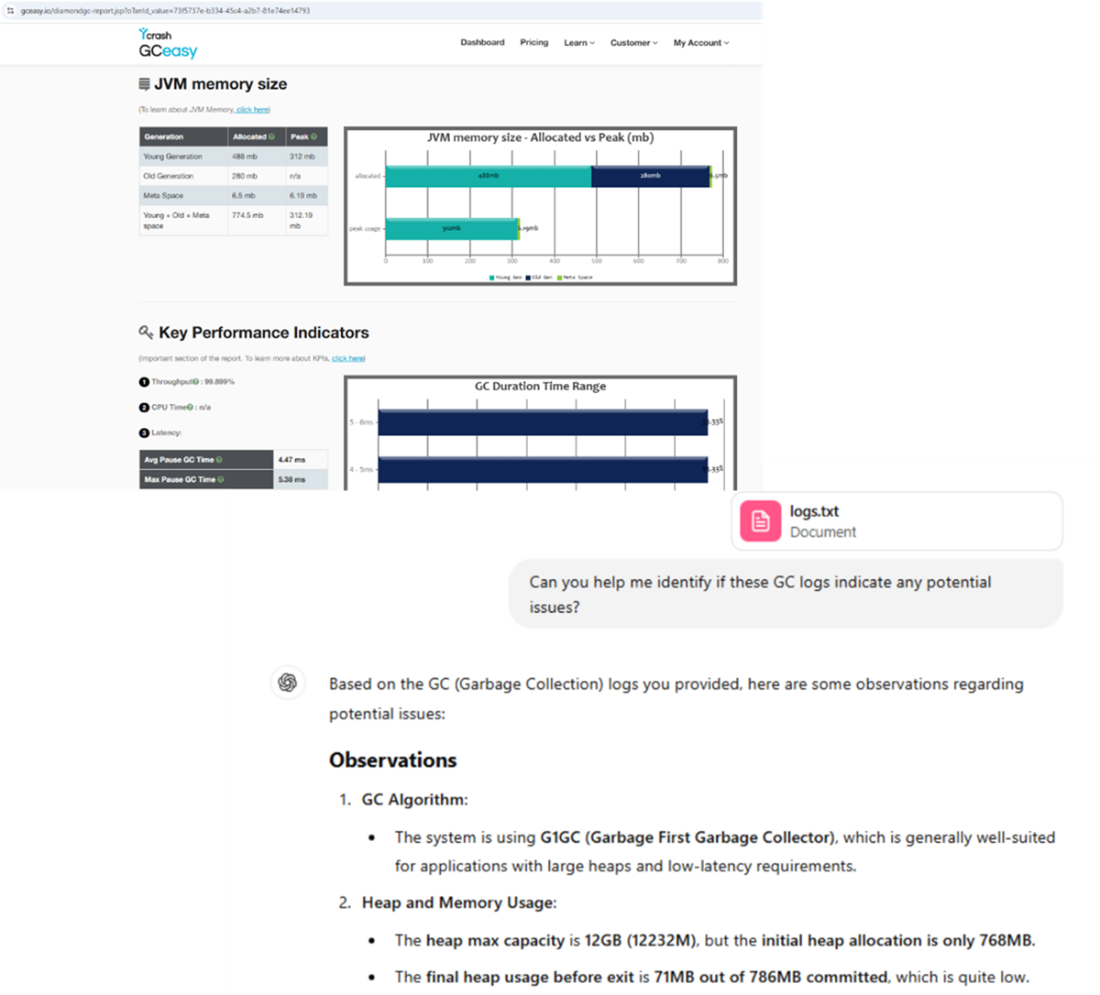
Using tools such as GCeasy or AI chat assistants to help you troubleshoot the GC logs.
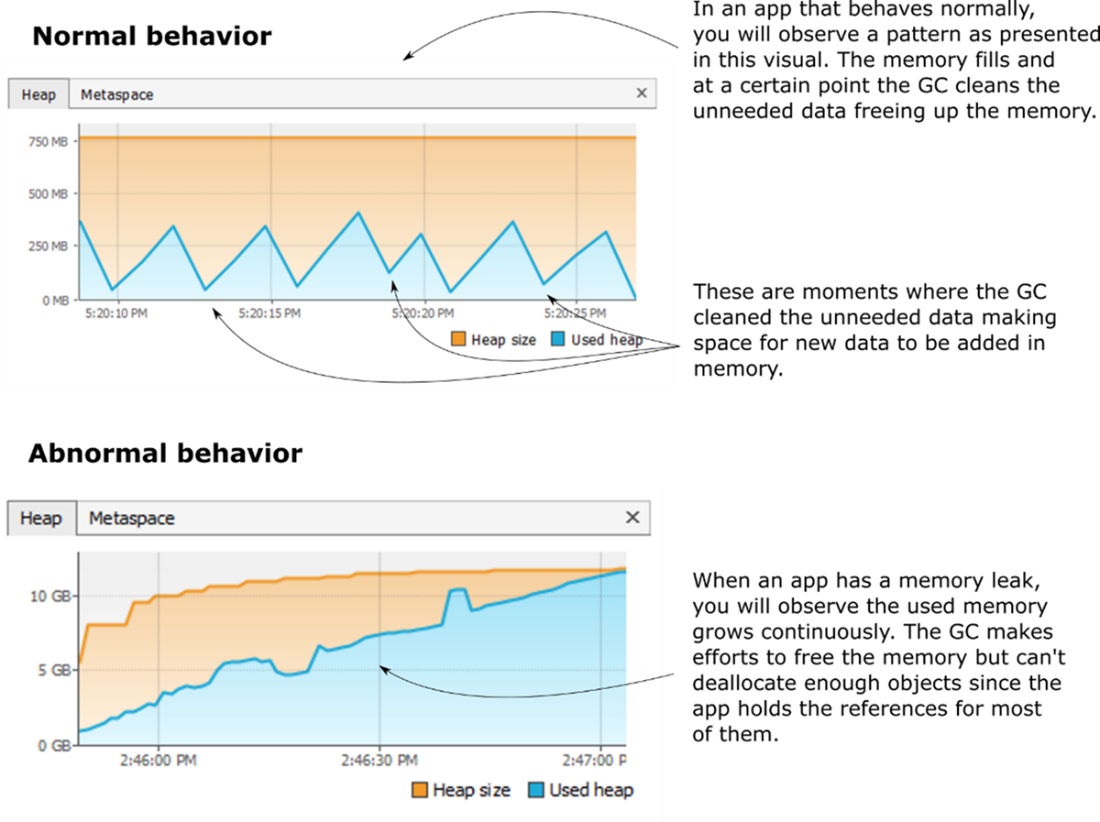
A comparison between the memory consumption graph of an application with normal memory usage and one affected by a memory leak.
Summary
- Garbage Collector logs are crucial for troubleshooting JVM memory management issues. They provide insights into memory allocation, garbage collection pauses, and heap utilization.
- Enabling GC logs is the first step in analyzing JVM memory behavior. The -Xlog:gc* VM option enables GC logging, helping developers track GC activity in real-time or store logs for later analysis.
- Understanding GC log structure is essential. Logs include details on GC events, pause times, heap size changes, and memory allocation patterns.
- GC logs help diagnose excessive GC pauses. Long GC pause times (typically above 50ms) can indicate performance issues, while frequent Full GC events suggest memory pressure.
- Heap memory organization impacts GC performance. Objects move through Eden, Survivor, and Old Generation memory regions. Inefficient memory usage can cause frequent GC interruptions.
- Frequent Full GC events may indicate insufficient memory or a memory leak. Logs showing frequent Full GC events with minimal memory reclamation suggest a leak, while effective but frequent Full GCs indicate an under-provisioned heap.
- Storing GC logs in files is recommended for deeper analysis. Use -Xlog:gc*:file=gc.log:time,uptime,level,tags to redirect logs to a file for structured storage and easier troubleshooting.
- Log rotation prevents excessive storage use. Configuring file count and file size limits ensures logs do not consume excessive disk space.
- Choosing the right logging level improves troubleshooting efficiency. Error logs capture critical failures, while Info and Debug levels provide additional insights into memory management.
- Tuning GC parallelism can reduce pause times. Adjusting -XX:ParallelGCThreads and -XX:ConcGCThreads optimizes CPU usage for better performance.
- AI tools and third-party services can simplify GC log analysis. Uploading logs to tools like GCEasy or using AI assistants can speed up troubleshooting.
FAQ
How do I enable GC logging for my Java application?
Use the VM option-Xlog:gc*. Examples:
- IDE run config: add -Xlog:gc* to VM options
- Command line: java -Xlog:gc* -jar app.jar
Tip: Enable GC logging when troubleshooting issues like high CPU, slow responses, or memory problems, as logs can be verbose.How do I write GC logs to a file with useful context (time, uptime, level, tags)?
Redirect logs with formatting fields: - Option:-Xlog:gc*:file=<file_path>:time,uptime,level,tags
- Example: java -Xlog:gc*:file=gc.log:time,uptime,level,tags -jar yourApp.jar
Ensure the JVM has write permission to the target directory.How can I prevent GC log files from growing indefinitely or being overwritten?
Use rotation and size limits: - Example:-Xlog:gc*:file=logs/gc.log:time,uptime,level,tags:filecount=5,filesize=10M
- Rotation behavior: creates up to 5 files; each up to 10 MB; oldest overwritten.
- To avoid overwriting across restarts, include a timestamp in the filename pattern or manage rotation externally.Which GC log level should I use in production vs. development?
- Production: preferwarning or error to minimize overhead (e.g., -Xlog:gc=warning).
- Staging/diagnostics: start with info; escalate to debug or trace only when needed.
- Remember: higher-verbosity levels include more critical ones (e.g., warning includes error).What should I look for in the GC initialization logs?
Key lines set expectations and constraints: - GC algorithm (e.g., G1, ZGC), JVM version - CPU count and available memory - Heap region size; initial, min, and max heap - Parallel and concurrent worker counts These help you reason about pause behavior, throughput, and potential bottlenecks on the current host.How do I interpret a single GC event entry?
Focus on: - Event type: young, mixed, full, or trigger (e.g., Allocation Failure, System.gc()) - Phase timings: identify unusually long phases (e.g., “Evacuate Collection Set”) - Workers used: whether GC parallelism matches available CPUs Normal young pauses are short; repeated long phases can indicate tuning needs or memory pressure.What GC pause times are normal, and when should I worry?
- Typical young pauses: 0–50 ms - Investigate if you see frequent pauses consistently >50 ms or prolonged Stop-The-World events What to try: - Adjust heap sizing (-Xms/-Xmx), Eden/Survivor balance
- Consider a low-latency GC (ZGC, Shenandoah) for strict latency needs
- Reduce object churn and encourage reuseHow can GC logs help me detect a memory leak?
Leak indicators: - After collections (including Full GC), heap usage keeps trending upward - Full GCs reclaim little memory; pauses grow and may end in OutOfMemoryError - The memory chart loses the healthy “sawtooth” pattern and instead drifts upward Next steps: capture a heap dump and analyze with a profiler (e.g., Eclipse MAT) to find retaining references.How do I distinguish insufficient heap from a memory leak using logs?
- Insufficient heap: frequent GCs (including Full GCs) that reclaim a meaningful amount; heap shows peaks and valleys; app remains stable but slow. - Leak: GCs reclaim little; heap steadily rises toward max; eventual crashes. Actions: - Insufficient heap: increase-Xmx/-Xms or scale out; optimize allocations.
- Leak: fix object retention; then validate with GC logs and profiling.How do I tune GC parallelism, and how do I know if it’s under- or over-provisioned?
Use: --XX:ParallelGCThreads for STW phases
- -XX:ConcGCThreads for concurrent phases
Signs in logs:
- Underutilization: long pauses with few workers used relative to CPUs → consider increasing threads.
- Overcommitment: long pauses with many workers (e.g., 16) and high CPU contention → reduce threads.
Tune iteratively and observe impact over time.
 Troubleshooting Java, Second Edition ebook for free
