1 The framework without a framework
This chapter frames Web Components as a “framework without a framework,” responding to the rapid churn of frontend tools and the team-level challenges that follow. It argues that developers can regain stability and longevity by leaning on browser standards—HTML, CSS, and JavaScript—while still getting the structure, reuse, and clear APIs that frameworks promise. The central idea is to favor durable, interoperable building blocks over framework-specific systems, so teams can share UI, scale across projects, and evolve without wholesale rewrites.
After motivating the need, the chapter explains what Web Components are and how they work: Custom Elements let you define new DOM elements with their own APIs; the Shadow DOM provides encapsulation so styles and DOM structure don’t leak; and standard attributes, properties, methods, and events form the public surface. It revisits the rocky history—HTML Imports’ failure, uneven Shadow DOM support, and early reliance on libraries like Polymer and X-Tags—and shows how modern ES2015+ features (modules, import, template literals, arrow functions) have made Web Components practical and pleasant. With broad browser adoption and lightweight libraries such as lit-html and LitElement, the emphasis shifts to Custom Elements as the core, with Shadow DOM and the template tag as optional tools.
The chapter then moves beyond single components to composing full applications. It treats components like any DOM element: design clear properties and methods, reflect attributes to properties when appropriate, and communicate via native and custom events. For cross-tree messaging, an event bus can complement or replace DOM bubbling, and microframeworks can add targeted capabilities without imposing a heavy architecture. Looking ahead, components compiled from React, Angular, Vue, or tools like Stencil and Svelte can interoperate as standard elements, and even WebAssembly-backed components may fit the model. The takeaway: choose what fits your team and project, but consider Web Components a viable, standards-based foundation for today and the future.
Expanded date picker UI
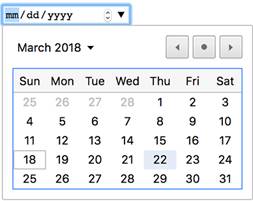
Enabling shadow root settings in the Chrome dev tools allows us to see the input tag’s hidden Shadow DOM.

The Shadow DOM protects your component from unintended consequences when CSS or JS might affect styles and nodes inside that aren’t meant to be altered. Instead, your component would have a custom-defined API to interact with using methods and properties.

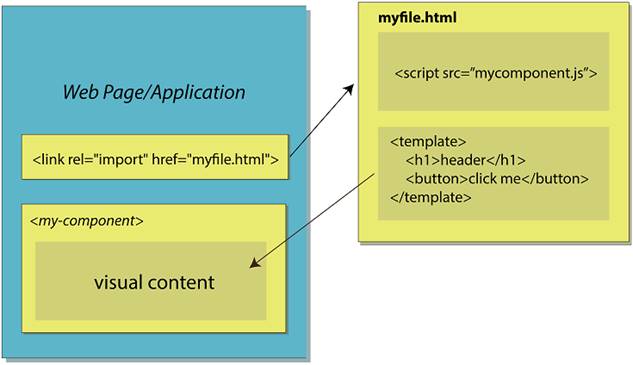
With HTML Imports, a file containing your component definition and your component’s markup could be imported right into your document.
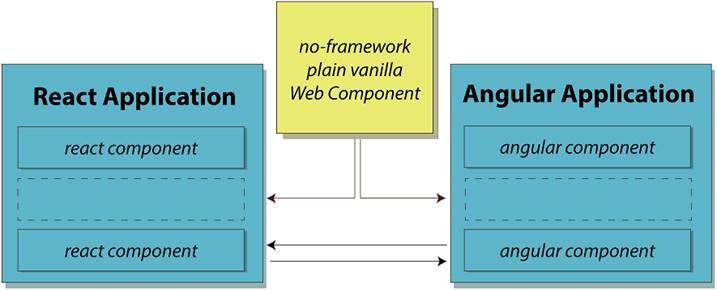
Web Components could bridge the gap in the future between popular frameworks. Not only can no-framework Web Components be used in these frameworks, but there are already experimental projects to compile a component in React, Angular, or Vue to independently run components that can be used anywhere.
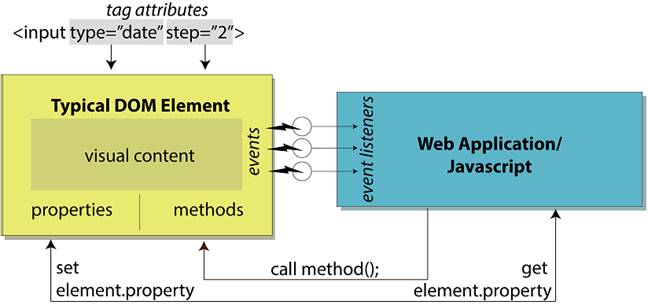
DOM elements have various properties, methods, events, and attributes that are used to tell the element how to act and communicate with the outside world.
Example web application comprised of Web Components, which are themselves made up of more Web Components. The hierarchy can extend to something small, like a custom button, or be as large as the entire application wrapped as a Web Component.

Events naturally bubble from the inside out of nested elements.
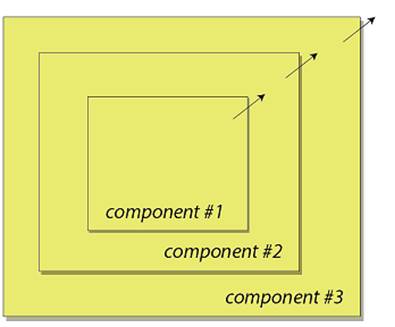
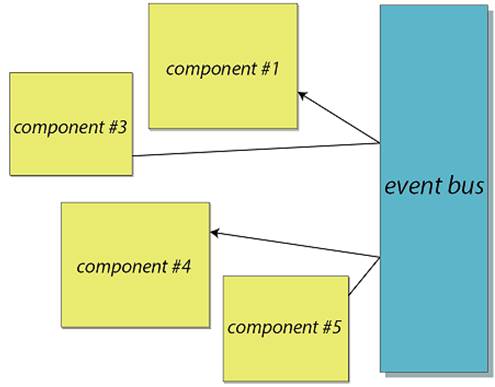
If normal event bubbling is not desirable, with a bit of code, you can create an event bus system to route events where you want.
Summary
In this chapter, you learned
- How Web Components have evolved in the past few years from a Google-owned working draft to a real web standard adopted by all the modern browsers
- The Shadow DOM as an optional yet important feature, while being on the verge of widespread browser adoption
- Web Components’ place in modern frameworks, as well as an agnostic part of any ecosystem
- The potential future of Web Components with an ever-expanding community of JS modules in the spirit of Polymer Project libraries like lit-html and lit-element, as well as non-Polymer Project ones like hyperHTML
- The individual Web Component versus an entire Web Component application

 Web Components in Action ebook for free
